Our Community is in read-only mode until April 8th, learn more here. You can still search existing threads or get help via Dropbox Support, the Dropbox Help Center, or Learn.
security
34 Topics
Dropbox silently enabled the setting to automatically upload my PC photos.
I've had the occasion to do a fresh install of dropbox on a couple of windows PCs recently, and both times I've discovered after the fact that the default windows autoplay setting was changed to enable silent uploading of files to Dropbox's photos folder. This setting had previously been set to simply open the volume in file explorer. This is appalling from a privacy standpoint. No, no pictures of my kids, or (to avert sniggers) compromising pictures of me, or my partner, or any other images I absolutely don't want online were uploaded. They certainly could have been though, if I didn't just happen to realise the setting was changed when I used a usb stick after installing dropbox. Whoever thought this default was a good idea needs to consider whether it really was worth the risk of compromising users' privacy. It should not be a default setting. It's outrageous it's a silent default setting. If it was an option stated in the dropbox install that I missed, it was nowhere near obvious enough - and still shouldn't be a default. Rant over.83Views0likes2Comments
Why do people have the permissions to download my shared files when I removed them?
I upgraded to the Professional plan to have my share options be very restrictive. To send files with no access to download, have a password, and an expiration date. I'm also the only person allowed to manage the folder. I uploaded my docs and created the folder. I then managed all this in the permissions. I sent it to a person, and they had download and share access AND they were not asked to put in the password. WHY are these permissions I set up not working? Please HELP! What am I missing here? I will cancel the plan, if this isn't going to work. Let me know, thank you.190Views0likes7CommentsNeed help my public links got suspended due to excessive traffic.
Dropbox Plan basic Are you a Team Member or Admin? n/a Do you have access to the email linked to the account? yes Are there any devices connected to your Dropbox account? laptop My public got suspended due to excessive traffic. I'm unable to unban the account. It asked me to reach out to support. Please let me know what i need to do to unban the link. Thx.98Views0likes3Comments
Can recipients of a shared folder link view other recipients of the same link?
I have some large files (several GB each) that I would like to make available to customers to test my company's software. Due to the file sizes, upload/download times can be quite long, and I don't want to chew up my organization's storage space by uploading each file multiple times. So, I'd like to place the files in a single Dropbox folder and share the link with each relevant customer. However, I want to make sure that anyone who I share the link with can't see who else I've sent it to. Recipients of the link may be early in the adoption process and can't be officially "exposed" as customers yet, and our customers may be competitors with each other, so I want to be sure that no one outside my organization can see anyone else who isn't part of either their or my organization. For example: In this folder, I am RK, BC is my colleague, and XH and ZW are employees at one of our customers. However, if XH and ZW weren't colleagues, I would want each of them to only see themselves, RK, and BC as members of the folder. Does this feature exist, and if so, how can I enable it in shared folders? I would want this obscurity to propagate downwards to any sub-folders (and sub-sub-folders) as well.Solved207Views0likes4Comments
I don't want to login/signup/copy to or copy link.
I'm using a personal setup with a Plus account, not planning to upgrade further. So within the Plus Account... I set this up to let a group of people view pdf's, photos, mp4s. NOT to link to them; they can share my link to the folders. I'm giving out a VIEW link and it allows downloads which is exactly what I want. I do not want them to join my folder. JUST to view them online or download them. From what I've seen every screen shows the line So&So shared this folder... (which is fine with me but the next part is not) I do not want the to Log in or Sign up. & I do not want 2 or the 3 button/boxes below that: Copy to Dropbox & Copy Link — because I don't want them to share the content. Does anyone know of any tip or trick to either hide these or nullify them? (Without an upgrade because the fees jump too drastically for this project.) I should mention that there are many friends that will View this content and Share it via my own link so giving each person a link would take major time. It's a privacy/respect-the-people thing. Hoping...101Views0likes1CommentSecurity concern: my full name appears on public folder links!
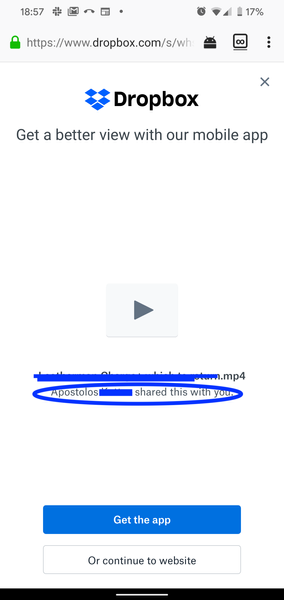
I recently shared a video from my public Dropbox folder - I copy/pasted a link to the video. When I shared the video w a friend, they pointed out that my full name shows up on the video link!! That's very concerning seeing that it's in the public folder which I would expect the Dropbox team to take appropriate precautions for maintaining my privacy - especially if I shared a file from my public folder. Interestingly that doesn't come up when I check on my laptop. But I just checked the link on my phone, and I see my full name! See attach a screenshot below.. (I blocked out my last name and the file name, but you can see my name shows up in the circled area) Does anyone know to remove my full name when sharing a link like this through my public Dropbox folder?6.7KViews2likes3Comments
Can I store adult content in my Dropbox account?
I have two questions: 1, I wonder if I could store porn/adult contents (videos, photos...) on my account? I am willing to purchase a premium plan to store them for a long term. And I am not going to share the adult contents to anyone, not public, just private use. All contents I downloaded on Internet, of course not child por*n or something illegal like that, just regular porn. 2, If I purchased for 1 year premium and I uploaded many videos and photos on my account, after 1 year I stop renewing the premium, what would happen? Can I continue playing videos, seeing photos online, downloading content on web browsers? or I have to renew my premium plan to see and download them? Thanks in advance!!!Solved25KViews3likes2Comments
Can you password protect folders in Dropbox?
Hi folks, The Dropbox website at https://www.dropbox.com/features/share/password-protection clearly states that it is possible to password protect a folder in Dropbox, and has an animation on the page that seems to show this happening in a couple of simple steps. However, my version of Dropbox (the basic personal free version) looks nothing like that, and this Dropbox forum has a number of (possibly out of date) posts stating it's not possible to password protect a folder. Can this be done, or do I need to look for a different product? The options I seem to have around sharing and security seem to have are very limited. Even in a free version, I'd expect to be able to add layers of good security! Thanks, GlenSolved36KViews1like13CommentsYour sharing activity has been temporarily suspended.
Dropbox Plan Basic Do you have access to the email linked to the account? Yes Hi everyone, I sent a DEM (direct email marketing) campaign via Pipedrive to about 400 contacts. In the email, there was a CTA linking to a Dropbox folder (shared via a public link). At first, the link worked correctly — but after a few hours, recipients started reporting that the link was no longer accessible. I’m using a Dropbox Basic account, so I can’t open a support ticket directly. The shared content was legitimate marketing material (a brochure and some media files), and the traffic came from the campaign — no suspicious activity or abuse. Could someone from the Dropbox team please check or help me reactivate the sharing feature on my account? I would also appreciate advice on how to manage traffic from campaigns safely in the future to avoid new suspensions. Thanks in advance for your help!196Views0likes3Comments