Your workflow is unique 👨💻 - tell us how you use Dropbox here.
sync
34 Topics
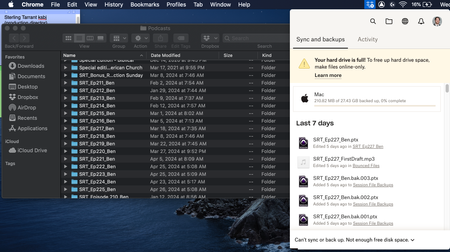
Dropbox keeps saying "Your hard drive is almost full" but it isn't
I keep getting message pop-ups from Dropbox saying "Your hard drive is almost full. Use Smart Sync to free up space." This is completely untrue. I have 60GB of free space on my computer, and I have only used 1.2TB of my 5TB online Dropbox storage, so neither my hard drive nor my cloud stotage is almost full. What is going on?Solved13KViews5likes10Comments
Mac seems to think HD is full of Dropbox files?
I'm using a Mac and have about 100Gb of DropBox folders, many are local on my HD as well (I have DropBox Plus 2Tb plan). I went through and changed all files to online only (grey icon) and now my DropBox folder says I have maybe 1GB...but in the finder when I look at overall space on the computer it's still showing HD is almost full! I have "Online only files on Mac" set to ON. I don't understand how DropBox deletes files because I had so much data locally stored and when I changed to online only I never saw anything show up in the Trash on my Mac...so I don't know how the files are deleted from my computer? How can I fix this so my computer doesn't think the HD is almost full? Thanks, Alan.Solved14KViews2likes24Comments
I'd like to sync certain folders in my Dropbox to a different drive
I know this is a frequent request, and I'm sure it will be until it's been provided! My team relies on DB a lot and we store a great deal of large files on it. At the moment I need to sync about 320GB of data, in 2GB chunks, which is a normal amount for my work. I don't have that much free storage on my system drive, and can't free it up atm, so I'm having to sync in chunks of files, then move those to my working drive and de-sync them from my system drive, rinse and repeat. I've tried downloading them in chunks from the web but they fail when my PC locks overnight. One solution is to set up DB in a VM and use that to sync certain folders to an external drive...but is that really the best way, when DB could just add optional paths for certain folders? I'm constantly surprised by how basic and unfeatured the client side is!2.1KViews1like6Comments
I updated the Dropbox app on my Mac and now it's trying to re-download all of my online files
Hey, so I recently updated dropbox, and now it's seemingly trying to redownload all of my online only files. Obviously I don't have that much storage, and I don't even have the option to make them 'online only' anymore. Everything I've seen online says to go into preferences and use selective sync. I did, and that didn't seem to change anything. I didn't try to use a different application either, as others mention. I simply updated dropbox and now it's become really hard to access my older files. Please help me1.4KViews1like9Comments
Name of the Dropbox folder
I am trying out out several Drive programs, now also Dropbox. I am working with Windows 11, using the D-disk for data. My aim is to sync the files on three computers in such a way, that the file structure is identical on each PC (and in the cloud). In the old days it was - I believe - possible to have structure such as D:\Dropbox\mainfolder\subfolder Instead of D:\Dropbox I get something like D:\Vox's Team Dropbox\ with at least two subfolders Is there any way to get a simple structure? Ideally I would even prefer something like D:\mainfolder\.. which is synced with D:\mainfolder\.. on the other PCs as well.1KViews1like1Comment
Hard drive is full, even though the files are online only.
I have made lots of files online only to free up space on my hard drive, but dropbox has stopped syncing claiming that there is not enough disk space. The top level folder says that it has 5TB of content, but in the four folders it contains there is less than 100 gb. I have restarted dropbox, restarted the computer, and waited for ages, but the problem persists... Please help.4KViews1like7CommentsTrying to copy a folder from an external drive to Dropbox, but get error about the disk space.
Hi all, I have just upgraded to Dropbox with 2 TB of storage. I am trying to copy a folder of 76.62 GB from an external hard drive to Dropbox which has 1.84 GB in it. I am getting the message: Not enough disk space to copy...Aditional 2 GB of disk space his required to copy this file. You can manage disk space by removing items from the Storage section of About this Mac. I have already made files Online Only. What am I doing wrong?Solved6KViews1like19Comments
Windows 10 - Accidentally Clicked Make Available Offline for 700 GB drive.... How to stop sync?
I was trying to access the folder in a new window and stutter clicked on the context menu and clicked "Make Available Offline" for a drive that's 700 GB of design files.. Aside from quitting the app to prevent it from syncing the entire drive and bricking my hard drive to capacity, is there a way to undo this setting? I'm afraid to restart the app because I don't know if it will continue the syncing process. Thanks, T.4.5KViews1like10Comments
Dropbox says there's not enough free space on Ubuntu but the cache folder keeps filling it up
My dropbox folder is located in a 1TB HDD. My dropbox folder is aprox 487ΜΒ and nothing else is located in this HDD. The chase foldes is 442GB and i am getting a red Dropbox icon with "can't sync not enough free space) When i delete the chase, the next day is full again. Everything was ok for the last 2 years until few days ago when sudenly this problem came up. What is the solution? I have Ubuntu 16.04.6 LTS.Solved2.7KViews1like6Comments
Disk space full with online only syncing
Everything in my dropbox folder is set as online only for syncing. However I can no longer save a file to the drop box as it is saying my disc space is full. I thought online only with smart sync means nothing is stored on your computors hard drive. Where am I going wrong?Solved11KViews1like10Comments