Your workflow is unique 👨💻 - tell us how you use Dropbox here.
sync
34 Topics
Can I delete the cache folder to free up space?
On a Mac regardless of the OS, there is 3 folders, ie. Hidden, Prefetch_Cache, Temp_Hidden, and these folders appear automatically regardless if the user has a Personal or Business account. 1. Can a user delete these folders, again, regardless of the account type, without deleting any files/folders on the Dropbox servers? 2. Do these folders get recreated locally on the Mac? 3. Does the Dropbox cache have anything to do with the overall space on the Mac?Solved50KViews1like3Comments
Mac seems to think HD is full of Dropbox files?
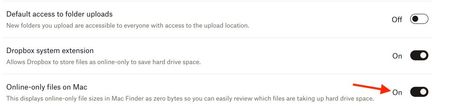
I'm using a Mac and have about 100Gb of DropBox folders, many are local on my HD as well (I have DropBox Plus 2Tb plan). I went through and changed all files to online only (grey icon) and now my DropBox folder says I have maybe 1GB...but in the finder when I look at overall space on the computer it's still showing HD is almost full! I have "Online only files on Mac" set to ON. I don't understand how DropBox deletes files because I had so much data locally stored and when I changed to online only I never saw anything show up in the Trash on my Mac...so I don't know how the files are deleted from my computer? How can I fix this so my computer doesn't think the HD is almost full? Thanks, Alan.Solved14KViews2likes24Comments
Dropbox keeps saying "Your hard drive is almost full" but it isn't
I keep getting message pop-ups from Dropbox saying "Your hard drive is almost full. Use Smart Sync to free up space." This is completely untrue. I have 60GB of free space on my computer, and I have only used 1.2TB of my 5TB online Dropbox storage, so neither my hard drive nor my cloud stotage is almost full. What is going on?Solved13KViews5likes10Comments
Disk space full with online only syncing
Everything in my dropbox folder is set as online only for syncing. However I can no longer save a file to the drop box as it is saying my disc space is full. I thought online only with smart sync means nothing is stored on your computors hard drive. Where am I going wrong?Solved11KViews1like10CommentsTrying to copy a folder from an external drive to Dropbox, but get error about the disk space.
Hi all, I have just upgraded to Dropbox with 2 TB of storage. I am trying to copy a folder of 76.62 GB from an external hard drive to Dropbox which has 1.84 GB in it. I am getting the message: Not enough disk space to copy...Aditional 2 GB of disk space his required to copy this file. You can manage disk space by removing items from the Storage section of About this Mac. I have already made files Online Only. What am I doing wrong?Solved6KViews1like19CommentsCannot Make Files Online-Only On Mac
I am essentially out of space on my computer despite having plenty available in the cloud, and the hundreds of gB's I'm using are taking up space on both my dropbox and my computer itself. When I right-click the file within Finder, there is no option to "make online-only". I have already turned this feature on as well as enabled the extension from the dropbox website. I have also already authorized all the necessary permissions within the macOS settings themselves regarding Finder extensions. Despite this, and multiple restarts amidst days of troubleshooting, I am at an impasse as my workload is backing up and so before I am brutally forced to switch to Google Drive for the foreseeable future, I figured I would try and solve these issues here first. I am on MacOS 10.15.1 (Catalina), and so this is my first culprit. I would love to avoid updating for the time being, although I'm aware this may be the problem. Any advice would be vastly appreciated. Thanks!6KViews0likes14CommentsKeeping Online-Only files at DropBox Due to Insufficient Local Storage
Please point out where I have gone wrong: At Setting/General, Online-only files on Mac set to “ON” as per appendix 1 At Finder (Mac), Open the Dropbox folder, Right-click the file or folder you'd like to set to online-only, expect to click on “Make online-only” but no such option at my desktop (MacOS High Sierra 10.13.6). Not sure why! The Local Hard disk is still clogged-up with DropBox files that I want to convert to online-only, as per Appendix 2. Please advise the steps required to clear out the files. Do I need to carry out file deletion? Next, I tried to transfer more files into DropBox (from an external drive) expecting no local hard disk space would be used since the new files are online-only. However, the same error message, as per Appendix 3, appears. Questions: What other settings are needed in addition to setting to ON for “Online-only files on Mac”? Why is there no option at my right-click on DropBox folders or files to pick “Make online only” What additional steps are need to read/paly my online-only files, apart from being connected to Internet. Do I need to delete the existing files at the Local Disk to free up the occupied space after my files become online only?Solved5.6KViews0likes3Comments
Windows 10 - Accidentally Clicked Make Available Offline for 700 GB drive.... How to stop sync?
I was trying to access the folder in a new window and stutter clicked on the context menu and clicked "Make Available Offline" for a drive that's 700 GB of design files.. Aside from quitting the app to prevent it from syncing the entire drive and bricking my hard drive to capacity, is there a way to undo this setting? I'm afraid to restart the app because I don't know if it will continue the syncing process. Thanks, T.4.5KViews1like10Comments
Can I delete the dropbox-dist-tmp folders on linux?
I keep getting a message from Dropbox that it cannot sync because I am out of disk space. I used a disk space analyzer and it turns out that Dropbox itself is using approx 600MB accross multiple folders with the name dropbox-dist-tmp-XXXXXX (they are located in my /home/): > du -sch .dropbox* 2.2M .dropbox 191M .dropbox-dist 159M .dropbox-dist-tmp-7hyie7y2 113M .dropbox-dist-tmp-d75lfgzf 132M .dropbox-dist-tmp-txi2smoy 596M total I've looked at these folders and they all seem to contain the same thing (except for the .dropbox). I've googled and found this somewhat similar issue on the Docker version of Dropbox. Can someone confirm that these are just cache files? Is it ok for me to delete some or all of them? Thanks PS: I am on Ubuntu 16.04 and I am not using any simlinks.Solved4KViews0likes5Comments
Hard drive is full, even though the files are online only.
I have made lots of files online only to free up space on my hard drive, but dropbox has stopped syncing claiming that there is not enough disk space. The top level folder says that it has 5TB of content, but in the four folders it contains there is less than 100 gb. I have restarted dropbox, restarted the computer, and waited for ages, but the problem persists... Please help.4KViews1like7Comments