We’re Still Here to Help (Even Over the Holidays!) - find out more here.
tablet
102 Topics
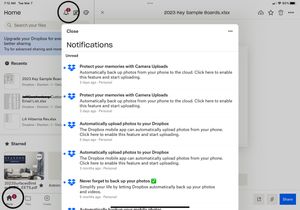
New message notifications will not go away
I have several “unread” messages from Dropbox which when opened or marked as read the “2” displayed above the icon will not go away. The marked as read button does nothing and there appears to be no way to delete the messages ? Using app on new iPad Pro.Solved14KViews9likes64Comments
The middle mouse button scroll isn't working in the File section of Dropbox.
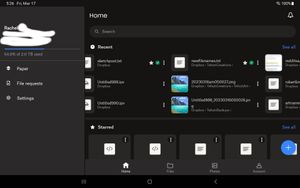
Scenario: Android Samsung S8 Tab in DEX with mouse. Middle button scroll works perfectly anywhere but in the file section of Dropbox. In Home, Photo and account section of dropbox the middle mouse button scrolling works. In file section it is not. Seems like a bug to us. Any take?169Views1like6Comments
I'm getting conflicted copies when using Pages on my iPad with Dropbox files.
Hi there. Whenever I use Pages on my iPad for word processing and the file it’s using is sourced from Dropbox I’m getting multiple conflicted copies generated. It feels like 1 every 5 minutes or whenever the program auto-saves so 30 minutes of writing will generate multiple conflicted copies in my Dropbox folder. Anyone have any solutions or workarounds to this? Thanks608Views1like4CommentsCan't add dropbox files from my iPad anymore
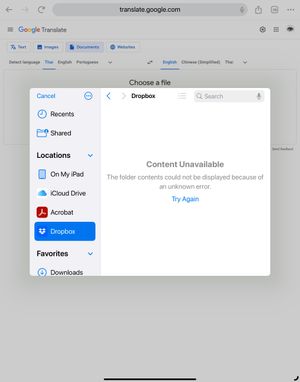
I have been using Dropbox for years and one of the feature I really like is the ability to import files directly from the Dropbox folder (on my iPad). For example, if a website is asking me for a copy of my passport, I would simply click on the upload, select the dropbox icon, and then choose the file I want to upload. But for the past couple of days this is not working anymore. It works fine on the laptop, but on the ipad I am getting this error (see screenshot below). I don't even know how to report this bug. Can anyone help? Is anyone facing the same issue?Solved1.6KViews1like3Comments
Can no longer save current or new MS word or excel file on dropbox with android devices.
I can no longer save current or new Ms word or excel files on dropbox, when I try and do so I get "Can't edit - This file is read-only. To edit it, first save a copy of the file". I get this even on brand new files never saved before, when I select Save a copy it comes up with the same meesage again. It works fine with my laptop just my phone and tablet are having the issue. Tablet Galaxy Tab A8: Android version 13 Dropbox app version: 320.2.10 MS word version: 1.0.1 (16.0.16227.20132) I have signed out and signed in, un-installed and re-installed, updated everything to latest versions, restarted everything.4.4KViews1like13Comments