We're making some changes to the Dropbox Community 👩💻 - Find out more here.
two factor authentication
25 Topics
My password was changed by someone else. What are the next steps?
Ok, here is my story - looking for info and/or advice. My Xfinity email account has been hacked several times over the past year. The last time (5 months ago) and yesterday, the hackers were able to use the email account to gain access to my Dropbox account. Last time, I enabled 2-factor security in Dropbox with both a mobile authenticator app and physical security keys. Yesterday, my Dropbox password was hacked and changed... I knew it was happening because I was aware that my email was being hacked and was literally dealing with it as it was happening. I realized that my Dropbox password was changed and I immediately changed it again. I WAS asked for 2-factor verification using the mobile app. I might have been asked for the security key, too - I don't remember exactly as I was dealing with several things at once. Point is that I WAS asked for something 2-factor to authenticate and allow the password change to occur. What I find troubling is that "they" were able to change the password/gain access to my account with 2-factor in place... Isn't that the whole point of having 2-factor? A physical "key" which you must be in possession of in order to make certain changes to the account??? I chatted with Luis in Customer Support - absolutely NO HELP WHATSOEVER - basically stated "no idea how that happened" and said that the problem was probably my computer's security or that I had used public wifi... Public wifi never happened. I pressed him to escalate the case or forward it to a security team (does that even exist??). He asked to move the chat to email - I suspect as a way to get rid of me.. Any info / advice would be appreciated. Thanks for your time.Solved15KViews1like5Comments
My iPhone was stolen and two-factor authentication is preventing my account access.
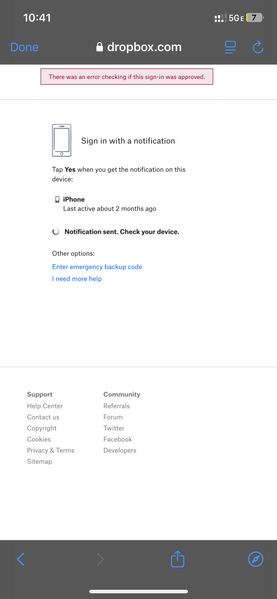
My iphone was stolen, and two factor authentication is stopping me from logging in. A code is supposed to be sent to my new phone, but I never receive it. Sometimes I receive an error message that says there was an error sending the code. I changed my password on my account with the Apple Private Relay address, but I am not receiving the code, so I can’t logon. I have 2 factor authentication on, and I can’t get the code from the Auth App either because of the stolen phone. See attached screenshot with error message Dropbox Support staff says I will never be able to recover my account because the email address is an Apple private relay address and I cannot send them an email from this address. This is ridiculous. I have recovered other accounts elsewhere that use Apple’s private relay address. Dropbox Support says they are going to just close my Help Desk Ticket without helping me further/with no resolution. This seems to be bad security recovery design. I would appreciate any help in gaining access to my account. I only have one device- my new iPhone. Thanks1.9KViews0likes8Comments
I can't log in to Dropbox 'Two-step verification text message can't be sent'
I am facing the 2 factor authentication by SMS error. The text code could not be sent. Not sure what happened. Yesterday I was still able to receive the code via sms and access normally but can't now and there is no other option to verify because i can't now access the account setting Could anyone please kindly provide me the recommendation? or Is this just the dropbox system error that we need to wait?Solved914Views2likes9Comments
Locked out of my Dropbox account due to two-factor authentication
In a nutshell: The last time I logged into my Dropbox account was June 22, 2025, and I had no problem. On July 8, I went to log in, and was for the first time asked for a 6-digit code on an "authentication app." Baffled, I clicked the "I still need help" link. Next I was asked for the 8-digit "emergency backup code." I searched my Mail and looked in vain through my Junk folder to see if I had been sent any such thing. That failing, I contacted Support. There followed a lengthy back-and-forth where I was told I had turned on "two-factor authentication" and that when I did, I would have been presented with options to link to an authentication app or to my mobile phone. And that I would have been sent the 8-digit emergency backup code. Now, I'm meticulous about recording passwords and making notes about online accounts. I have no recollection and no record of signing up for that. Did I accidentally? Did someone use my old password and sign up for it, to hijack it? Yet, if hypothetically that happened, they did not change the password, and last week, in a last ditch effort, I successfully did, but the two-factor prompts still come on. I am baffled. In the back-and-forth between myself and the support tech, I have offered to prove my identity to the support tech. There are many ways I could do that. His response was, that was not possible, to repeat the advice that he had already given me, and to close the ticket as "solved." If such a thing as Advanced Tech Support? Will someone working there revive my faith in Dropbox or reinforce my feeling that it was entirely misplaced? Note that the account I am having trouble with is not the one I am logging into this forum with, because for that that I would need to be able to fill in a two-factor authentication code, that for all intents and purposes, is non-existent. It's all been so dispiriting. But it's a free account, and I guess you get what you pay for.Solved706Views0likes5CommentsSomeone accessed my Dropbox account and I can't get help
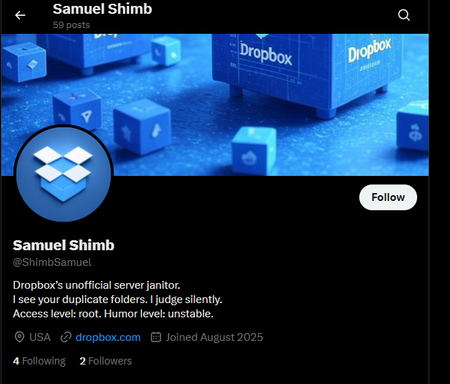
Dropbox Plan Professional Are you a Team Member or Admin? No Do you have access to the email linked to the account? Yes Are there any devices connected to your Dropbox account? Phone, tablet, work laptop Question or Issue A few days ago, My Dropbox account was hacked by an individual calling themselves Samuel Shimb (see screenshot below). They managed to get access to my account even with 2FA enabled (via SMS)! I want to make people aware of this and the fact that, when I raised this to Dropbox's chat and Support people, they downplayed it and said they's pass it along to their colleagues. Even when I mentioned in my communication with them that I had 2FA enabled, but did not receive any 2FA OTP, in their responses, they still went ahead to say that I must enable 2FA. I have been asking for escalations without any assistance on this matter. I am a paying Dropbox Professional customer, and I want to know how someone accessed my account outside of the normal authentication flow. Even if the hacker managed to obtain my Dropbox password (which I was not using anywhere else by the way), I want to know how they bypassed the 2FA. There were no indications in my GMail inbox of someone trying to reset my Dropbox password (so the hacker did not gain access to my email account first). I was able to login normally using my Dropbox account even after the attack. This has resulted in sensitive information being exposed to an attacker whose intentions I do not know, including work files. However, Dropbox staff have been downplaying this isse. Maybe because this could be a vulnerability on the side of Dropbox and they won't admit that.500Views1like11Comments
Need help accessing my account due to 2FA, and security one-time code.
Hello everyone! I am having the same issue as many people have had, but I am having no luck in getting it rectified and dropbox will not return any of my emails. I had two devices authorized on my account. My desktop computer and my phone, both had access to my dropbox. The email I had attached to the account, was for a business that was purchased and absorbed, so those email addresses were replaced and we had no access to them any longer. My devices however still had access, and I thought I had changed the recovery emails to my new email, and apparently that is the case. I needed a new phone, and of course the device wasn't recognized, so it said it sent the one time code to the other devices. I went to check on my desktop, and windows had performed an automatic update and had restarted the computer and I was unable to login there as well suddenly. I tried answering all of the questions via the recovery page, and it says that some answers are incorrect, and since I set the dropbox account up in 2017 I may have some of the dates wrong, I just don't recall exactly, but I thought I had them right. So as it sits, my desktop cannot access it, despite previously working for 7 years and is a recovery device, and my new phone cannot access it because I need a recovery code. I traded the old phone in for a credit and completely forgot about the 2fa, until it was too late. Honestly I don't even recall adding 2fa on dropbox, because I never would have, but maybe it is a default setting, I guess I don't know. I am a technical support specialist, and I had over 30 years worth of technical data, error codes, manuals and many other items that are irreplaceable. I even emailed dropbox to try and upgrade my account so I can use that account as a technical database for all of our technicians to utilize remotely in the field, but nobody will respond to me. I am at a loss, because this information is all of my personal stuff and is no longer available to me and I need it badly. If someone has a suggestion, I would greatly appreciate it, thank you.499Views0likes15Comments
Locked out of my account because I don't have access to the authenticator app
I have been locked out of my account, my phone died and while the number is the same, I don't have access to the 2 Factor Authentication app, I was using Microsoft Authenticator. However, I was never prompted to setup a backup code, which support told me should have been emailed to me. And while I know I set up a backup email, there is no option to unlock the account with any other method. Dropbox Support has told me there is no way to access my data now, and that's unacceptable. I'm so very very disappointed in Dropbox, they take more than 24 hours to respond to emails, and at odd hours too, and even if I respond to them right away, it takes a day or two to get a response. I have seen other posts in this community and other sites about this exact same problem that were resolved. I am most upset that I was told by Dropbox Support that I would still have access to my own files that were on my desktop, but I have been locked out of access to MY OWN FILES. This is absolutely unacceptable. I am totally at a loss what to do, it is so frustrating, and Support has been extremely rude and dismissive. Even if given access to my files, I will not be using their services anymore. Can anyone help me? Thank you. Do you have access to the email linked to the account? (Yes) Are there any devices connected to your Dropbox account? (No)399Views0likes5Comments
Locked out of my account after phone number change
Device (Samsung Galaxy A25) Operating System/Browser (if using the web) (Android 15, One UI 7.0) Question or Issue I recently changed my phone number, while keeping both my old number and (an even older) backup number saved on my Dropbox account. Now, I wanted to log into my account, but the app requires a security code which can only be sent to my old inactive number, but not to my (still active) backup number. So I am locked out of my account despite having saved an active phone number. On the web browser, it is possible to request a code being sent to another phone number, but the page then frequently freezes, spits out error messages (like "something went wrong" without saying what went wrong) and after 2-3 login attempts, it already locks my account, saying "you logged in too frequently". Could you please: also allow for the option to change the phone number to which a code shall be sent within the desktop app? make sure to allow for more requests for a security code before locking the account? I am sure that more users get annoyed by this, as phone number changes happen from time to time and a security code having to be re-sent can happen frequently when being in an environment with bad mobile connection.Solved300Views0likes4Comments