We're making some changes to the Dropbox Community 👩💻 - Find out more here.
upgrades
180 Topics
Upgrading from the Dropbox Plus to the Dropbox Family plan
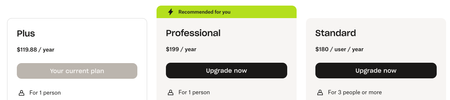
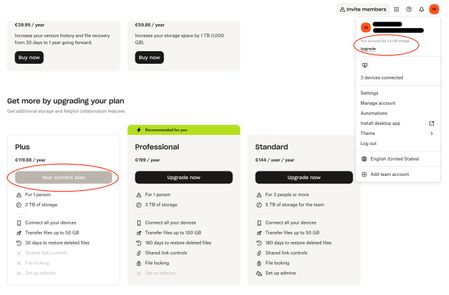
I currently have a Plus plan and would like to upgrade to Family to merge mine and my spouse's plans. I am billed on my credit card directly by Dropbox for the current plan. When either of us visits the Upgrade page, all we see are Plus (our current plans), Professional, and Standard. Neither of us was a part of a team previously. (How would we check that?) What can I do to find/reveal the Family Plan option? Thanks!48Views0likes1Comment
I need to add more space to my personal Dropbox account, without upgrading to a team.
I have the largest account available to an individual and have added the one time storage to my account. I have a large family and have a lot of photos and videos that I want to store. However, I'm almost out of space (nearly 4TB) and need more. When I tried to upgrade, my only option for more storage than 4TB is to upgrade to a business account for three users at an increase of an additional $225/year. My first TB of increase was $60 and it hardly seems right to force me to delete my files or upgrade for 80% increase in price. Thank you.240Views0likes4Comments
I paid for an upgrade to 2TB (with 3 months extra), but nothing has happened.
Dropbox Plan Plus with 3 months extra! Payment Method IDEAL How did you upgrade? Through the UPGRADE button Question or Issue 28-02-2026 Dropbox iDEAL | Wero -119,88 Omschrijving: [redacted] 7180125967132235 revenue api transaction id 6fa1a829 IBAN: [removed per Community Guidelines] Kenmerk: 28-02-2026 21:52 7180125967132235 Valutadatum: 28-02-202669Views0likes2CommentsI'm unable to add any new licenses to my team
Hi, I already have 48 licences. I need to invite more members / add more licences. it is not allowing me to add more licenses and keep giving me below errors: "Something went wrong on our end. Close and try again." or "Failed to load pricing information" Any help would be appreciated. Ticket id already raised = 2606894581Views0likes1Comment
Account upgraded last night, but upgrade not visible yet
Hello, I upgraded my Dropbox account last night and the payment was processed successfully. However, the upgraded plan is still not reflected in my account, and the additional features/storage have not been applied. I have already tried logging out and back in, as well as refreshing the account page, but the issue persists. Could someone please advise on the next steps? Also, how long does it typically take for an upgrade to become active? Thank you in advance for your assistance.77Views0likes3CommentsAfter upgrade to Dropbox Teams, I have 2 Dropbox accounts or at least 2 Dropbox folders.
Dropbox Plan Dropbox Business upgraded to Dropbox Teams Device Dell XPS 16 Operating System/Browser (if using the web) Windows 11 Pro Dropbox App Version (if using the app) 240.4.8609 Question or Issue I had a Dropbox business account that was 6TB. I ran out of room so I upgraded to Dropbox Teams and 15 TB. I just figured that my Dropbox business account would become the Dropbox teams account but it did not. Now I have 2 Dropbox accounts (or at least 2 Dropbox folders) with 2 different names but using the same email address. I only want one account with 15 TB of room. Question: How can I get all my files over to the Dropbox Teams account? Question: At renewal time, does this mean I will be charged for the Dropbox Business account and again for the Dropbox Teams account?88Views0likes2Comments
Cannot upgrade my account after getting converted back to an individual account from a team one
Hi everyone, I’m posting here because I’m currently blocked from working due to a Dropbox account issue and I’m looking for advice or similar experiences. Here’s what happened, step by step: I had a personal Dropbox Essentials account I was temporarily added to a Dropbox Business team As expected, Dropbox automatically cancelled my personal plan I was then removed from the team and converted back to a personal account Since then, my account is stuck in a Basic state Now the critical part: I tried to upgrade back to a paid plan twice Both times the bank confirmed payment authorization Dropbox shows errors like “invalid value” The plan is not activated I can access files via browser, but local sync and shared-folder workflows are broken, which effectively blocks my work and my Basic account does not have enough storage for my files It looks like the account is in a corrupted state between Team billing and Personal billing. I’ve already opened a support ticket, but in the meantime: Has anyone experienced this exact Team → Personal → Basic limbo? Is there a known fix besides waiting for manual intervention? Would migrating to a new account be the fastest safe solution? Any insight is appreciated — this is a professional blocker, not just a billing annoyance. Thanks in advance. Andrea Dropbox Plan (Essential? basic? Professional? don't know anymore) Payment Method (applepay.) How did you upgrade? (I wish I did)162Views0likes8Comments