Your workflow is unique 👨💻 - tell us how you use Dropbox here.
windows
996 Topics
Add option to disable icon overlays in Windows Explorer
Please add an option to disable Dropbox icon overlays. It is so frustrating to remove Dropbox Shell Icon identifiers from the top of ShellIconOverlayIdentifiers list after each update! It is disrespectful to users to decide for them which overlays they need. I'm using TortoiseGit and I really need its overlays, they are useful and important for my work. Every time Dropbox updates I can no longer see status icons and have to go to Registry editor and remove newly added and USELESS Dropbox overlays. I've seen dozens of feature requests from Dropbox users for many years but Dropbox pretends everything is fine! UPD: I had patience to open a thread and communicate with Dropbox team on this issue. After almost 2 years, more than 100 upvotes they have just thrown my idea away suggesting me to edit Windows registry. I've heared your answer, that's how you treat your loyal users. So long Dropbox!33KViews129likes80Comments
Cannot establish a secure connection after dropbox update to 111.4.472
After the dropbox app (Window 10) updates itself to the latest 111.4.472 version, I'm getting this 'Cannot establish a secure connection'. I've checked my time on my laptop, router. It's fine. I've disabled firewalls and the whole Eset Security. I've checked my ports. Everything is fine. I've turned off the proxy setting inside app. Scanned my system for viruses, nothing fount. The only solution is to revert back to the older version, but if I do so, the app will update itself so I'm at the beginning.Solved48KViews44likes440Comments
How can I keep my files local and not online only?
I have a new computer & I've been trying to download my DB files to my new computer. I've just discovered that YOU decided I need to save space on my hardrive & half my files are on some cloud rather than downloaded to my computer. I DON'T WANT THIS. I've tried everything to download everything on Dropbox to my new computer & I've spent way too much time trying to remedy this--- way more time than I needed or wanted to spend! I am not interested in Local or online whatever it's called. Just leave my Dropbox alone. So, how do get my Dropbox back to the way I had it? How do I get rid of this cloud crap? The so-called solutions I read so far do not work for me. And, please, in the future, LEAVE MY DROPBOX ALONE.Solved41KViews34likes24Comments
Why is the Dropbox Desktop App no longer available?
The dropbox desktop app had such a great user interface and was a good workflow for our team.. unfortunately as of 17 Jan 2022, it has been dropped.. I wonder why this change was made, and i'm just hoping the application is being improved instead of being killed. What we enjoyed out of the desktop app was the ability to pin specific files to the main dropbox for quick access, which everyone was able to identify quickly. with the Finder app, it was hard to see pinned items, and with the website, its a redundant process – requiring lots of extra steps – having to open up the website to identify the folder before pinning them. the website does not give as much visual cues as the desktop app previously had. Please, dropbox, #bringitback!Solved23KViews25likes84Comments
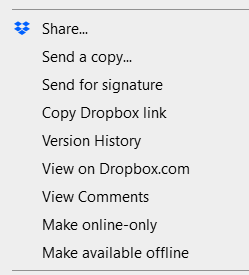
Is there a way to remove the Dropbox options from the context menu?
Hi, recently Dropbox has started cramming my Explorer context menu with all of these options I mostly don't plan to use: Come on. Do you think it's ok to just dump all your stuff in there? If every app on my PC would do the same, would I have to manage dozens of entries on that menu? This is terrible UI design, it's bloat, it's disrespectful of your users. How do I turn that off? I only use "Copy dropbox link", not the others. Thanks.10KViews22likes33Comments
The Dropbox desktop application will no longer be supported for Windows 7, 8 and 8.1 on October 22nd
Congratulations Dropbox! You've just put the nail in the coffin of all W7 users who prefer not to be spied on and constantly used for data scraping! Well done. If the constant scaremonger nagging about running out of space, the constant begging to upgrade, the incessant app updating demands, the constant USB device interrogation upon connection wasn't enough of an incentive to finally ditch Dropbox for good, then the cutting off of users of a still perfectly good and functional, non-spyware infested OS will be the last straw. Thank you Dropbox for giving me the incentive to go to your competitors instead and get out of your ever more bloated crapware ecosystem. Sometimes, people need a little push to get away from what's comfortable and familiar, even though they suspect just how bad that relationship is for them. I thank you Dropbox for giving me this little push. Goodbye.9.3KViews11likes33CommentsDropbox very slow with Windows explorer
After wasting time, as usual, with Dropbox's assistance, I try to ask here. My problem is relatively simple to explain and consists in the fact that if I use Windows Explorer, navigating in the Dropbox folder is torture since any operation it's very slow (creating a folder, copying a file, etc...) while if I use, for example (but it couldn't be the solution) a file explorer like Explorer++ everything works perfectly. Another thing I verified is that if I navigate to the Dropbox folder from a Windows window that opens for example when I want to open/save a file, everything works without problems. The problem remains confined to windows explorer. Can anybody help me? Thank you7.9KViews11likes12CommentsCertFindCertificateInStore failed with: (-2146885628) error in Windows Event Viewer
As multiple other users have already reported over the last couple years, I am seeing many of these error events in my Windows 10 Event Viewer, all coming from the DbxSvc (Dropbox service) event source. Can you all please fix your desktop client software to stop spamming my event logs with these errors? This issue has dragged on far, far too long already. Either stop emitting these errors, or fix the underlying problem. Thank you.Solved46KViews10likes100Comments