Your workflow is unique 👨💻 - tell us how you use Dropbox here.
windows
38 Topics
Why is the Dropbox Desktop App no longer available?
The dropbox desktop app had such a great user interface and was a good workflow for our team.. unfortunately as of 17 Jan 2022, it has been dropped.. I wonder why this change was made, and i'm just hoping the application is being improved instead of being killed. What we enjoyed out of the desktop app was the ability to pin specific files to the main dropbox for quick access, which everyone was able to identify quickly. with the Finder app, it was hard to see pinned items, and with the website, its a redundant process – requiring lots of extra steps – having to open up the website to identify the folder before pinning them. the website does not give as much visual cues as the desktop app previously had. Please, dropbox, #bringitback!Solved23KViews25likes84Comments
Dropbox app is constantly creating desktop.ini files - how can I disable this?
As per the title; the latest dropbox is now generating desktop.ini files pretty much as soon as they're deleted (they were recreated only on dropbox starts earlier, so a delete upon startup was all I needed). This is detrimental for me; how can I disable this behaviour? They are pretty meaningless files, too, this is all in it: ■[ . S h e l l C l a s s I n f o ] I c o n R e s o u r c e = C : \ P r o g r a m F i l e s ( x 8 6 ) \ D r o p b o x \ C l i e n t \ D r o p b o x . e x e , - 2 3 0 1 Edit: -for anyone stumbling onto this one- There is no solution, dropbox support is unable to reproduce the issue (using windows built-in file manager does not show the file!). There's also no promise of any solution, ever. This is what you get you bloody miserable user for paying for this product. Best Option: use another product.Solved12KViews7likes35Comments
"View your recycle bin for Dropbox" - how can I disable this?
I'm not sure if it's a recent addition or if I simply didn't notice it before, but recently, at the bottom of the open "Recycle Bin" on Windows, it has a bar along the bottom that says "View your recycle bin for: Dropbox", with 'Dropbox' a link that opens my Dropbox account in the browser. Is there any way to turn this off? It's not a useful feature for me, and it takes up screen space that could be used for displaying more of the Recycle Bin contents. Thanks.Solved6KViews6likes19Comments
I cannot rename a file in the Dropbox folder
Good Morning Everyone hope someone help me. We use the dropbox from desktop file. If I tried to re-name the file in the desktop, it doesn't let me change longer ( It used to be okay). However, if I re-named the file in the Dropbox Website, it let me change the name longer. ( it automatically changed the name in my desktop file too) Then, I cannot open the file from the desktop until I rename to shorter or copy to additional file to rename shorter. I want to rename the file in the desktop and open it without rename to shorter. Can anyone help me to fix the issue?7.3KViews3likes9Comments"This folder/ file has properties that cannot be copied to new location" when using the desktop app.
Can anyone help? I'm having trouble moving my files, I have Dropbox on my phone, tablet, home computer, work computer and work apartment but recently I've noticed If i try to copy a film for example, from my work computer to a colleagues hard drive or music to my usb flash for the car it says "this folder/ file has properties that cannot be copied to new location" Whats the problem here, am I missing something simple?Solved44KViews3likes17Comments
Turn automated file deletion into "Make online-only" by default
Hello, I use security cameras for research. The cameras are set up to save video recordings directly onto a PC (Windows 11) on the same local network. The folder where videos are saved is inside my Dropbox folder, and the desktop Dropbox client syncs automatically. Videos are therefore automatically uploaded to Dropbox once each file finishes being recorded. This works great. The issue I am having is related to the capacity of the local hard drive. The security camera management software is set to automatically delete the oldest videos whenever it runs out of storage space, so that it has somewhere to save new videos. This causes these oldest videos to be deleted not only from my local drive, but also from the Dropbox account (Dropbox for Business). I would like to configure Dropbox to instead treat this automated deletion the same as if I used the "Make online-only" option on desktop, i.e. allow the local videos to be deleted as needed by the camera management software, but retain all backups in the online Dropbox. Is this possible? I'd like to be able to do this while simultaneously retaining as much recent video on the local drive as possible, because we often work with these local video files. This means that making older videos online-only in advance is not really the answer I'm looking for. Thank you!Solved2.1KViews2likes5Comments
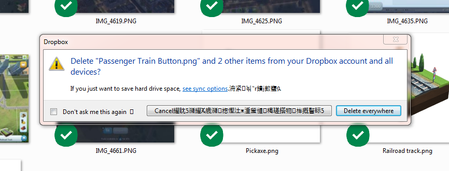
Chinese characters in my deletion confirmation pop-up on Windows
Hi, Something new happen recently when I was deleting some files. When I delete something from my Dropbox, I get a notice that they're moving the files to the Recycle Bin and then another prompt that asks me if I want to remove those files from all the devices connected to the dropbox. The new thing that happen is the last prompt now contains what appears to be Chinese characters. (Picture attached) I've reinstalled the Dropbox on both devices connected and that hasn't fixed the issue. Does anybody know what this is or how do I fix this? I haven't seen it when using any other program. The characters doesn't appear on the "moving files to the recycle bin" prompt but only on the prompt that comes after which is asking if I want to remove the files from the other connected devices. Also the Chinese characters aren't always in the same location. Sometimes they're beside the Dropbox at the top of the prompt and sometimes they on the "Delete Everywhere" button.Solved8.5KViews1like35Comments
Windows desktop shortcut keeps changing
Most strange. I find the quickest way to access my Dropbox folders in Windows is by having a shortcut on the desktop that just goes directly to the Dropbox top-level folder. So - I create that shortcut and it works just perfectly for a while. But - after a reboot (I think it's just then), that shortcut gets replaced by a Dropbox shortcut that is linked to the Dropbox executable and I then get the Dropbox-specific folder window instead of the file explorer one. Why is this happening? Does Dropbox always insist on creating a desktop shortcut and mine is just being overridden? Anyone know of a way around this? Thanks!1.2KViews1like2Comments
How To Remove The /DropBox from the path In C Drive
Whenver I navigate through my folder, and go to the main drive, the path makes no sense as it is /dropbox/my pc. I deleted dropbox and its still there pls help. How do i remove the dropbox folder and dropbox from the path. its driving me nuts! that is the /dropbox thing im talking about. i want it removed!!!Solved15KViews1like59Comments