Your workflow is unique 👨💻 - tell us how you use Dropbox here.
windows
38 Topics
I changed computers and now my files are missing. How can I restore them?
I purchased a new Dell laptop in December. We transferred everything over from the new one. I now noticed many of my dropbox files are missing. The folder structure is there but the files are missing. I see dropbox offers a way to create a back up but I have made changes in some of my current dropbox folders since December. Will a back up override my current folders? Bottomline, I am trying to recover my missing files.76Views0likes2Comments
Transferring files from desktop Dropbox to desktop Box - properties missings and files don't open
I can see this problem was discussed 11 years ago and a member describes the problem in a reply 10 years ago, but I still don't find the solution. I am trying to move files from my desktop Dropbox to my desktop (LU) BOX, like I have done countless of times before this. But I get a warning that the properties will not get copied with the file. I tried to ignore it but then I am not able to open the file after it has been copied into BOX. It has so far been Excel files and PNG I've tried to transfer, without luck. I would most appreciate help with this.101Views0likes6Comments
I can't move, copy or delete content from within the Dropbox folder on my Windows 11.
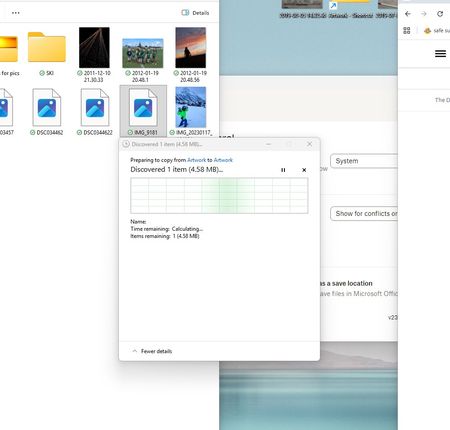
Device My awesome PC Operating System/Browser (if using the web) Win11 Dropbox App Version (if using the app) 238.4.6075 Question or Issue We have old/historical jpeg/photos on drop box. I am having trouble moving, copying, pasting individual photos. When I try to move, copy, delete it seems to get stuck on the attached system process -> Windows says calculating, but doesn't seem to progress further. I also cannot see a preview of these files in the thumbnail/folder, they are just blank, though newer files in the same folder do have the preview image. I am trying to move bulk files though I cannot even move individual files ATM. Its only old files that we've not opened/viewed for years. Any ideas?109Views0likes2CommentsDropbox app is constantly creating desktop.ini files - how can I disable this?
As per the title; the latest dropbox is now generating desktop.ini files pretty much as soon as they're deleted (they were recreated only on dropbox starts earlier, so a delete upon startup was all I needed). This is detrimental for me; how can I disable this behaviour? They are pretty meaningless files, too, this is all in it: ■[ . S h e l l C l a s s I n f o ] I c o n R e s o u r c e = C : \ P r o g r a m F i l e s ( x 8 6 ) \ D r o p b o x \ C l i e n t \ D r o p b o x . e x e , - 2 3 0 1 Edit: -for anyone stumbling onto this one- There is no solution, dropbox support is unable to reproduce the issue (using windows built-in file manager does not show the file!). There's also no promise of any solution, ever. This is what you get you bloody miserable user for paying for this product. Best Option: use another product.Solved12KViews7likes35CommentsI use a Windows device, and my Dropbox files take 7-10 seconds to open in my File Explorer.
recently i have had issues with dropbox (db) opening files extemely slow. i figured it was my computer so i bought/installed a new 1tb solid state drive, reformatted, re-installed everything.. and it still opened slow, like 7-10 seconds per file (yes, can drive a man nuts). i decided to do a little troubleshooting and copied a file to my desktop to see if it still opened slow and BOOM.. flew open. so it looks like its dropbox that is having the issue. my dropbox folder is located on my c:. we live in the woods and have satellite for internet (not sure if that matters). windows 10, and brand new dell precision work station. windows defender is disabled (read that was an issue also). the files i mostly use are "autocad" files (.dwg) thanks for the help!Solved15KViews1like27Comments
My desktop app is removed from Windows 10, but there's a Dropbox folder under "Desktop".
I deleted Dropbox from my PC which runs on Windows 10. There is still a Dropbox folder that shows up under “Desktop” in the file explorer navigation pane. There seems to be no option to remove it. How do I delete this?Solved22KViews0likes7Comments
What can we do with ._ files? Should I delete them?
In every Dropbox folder we have duplicatie files with ._ in front. Recently: - we have used a SD card for storage (not anymore) - we have added a Windows computer to the sychronisation (before only Mac's). What can we do with these files? Can we hide or delete them? Thank you, LauraSolved45KViews0likes4Comments
Impossible to delete the old Dropbox main folder Windows 10
The support people that answer the chat have no clue about anything, thy just try to stall by asing some standrad quetsions and then wokring very hard to missunderstand whatever you say. The "real" support (if such exists) is only reachable by email. Dropbox was good, but have gone full soviet. Im also looing for a new service.10KViews1like10Comments"This folder/ file has properties that cannot be copied to new location" when using the desktop app.
Can anyone help? I'm having trouble moving my files, I have Dropbox on my phone, tablet, home computer, work computer and work apartment but recently I've noticed If i try to copy a film for example, from my work computer to a colleagues hard drive or music to my usb flash for the car it says "this folder/ file has properties that cannot be copied to new location" Whats the problem here, am I missing something simple?Solved44KViews3likes17Comments
Move my Dropbox files from PC to external drive
Hi! I don't have too much space on my PC to download all my files via Dropbox Desktop App. My goal is the backup all my files saved to Dropbox to an external drive. After I copy the downloaded files to an external drive, how can I then delete them from my PC to free up more space without it syncing and deleting the files from Dropbox.com?154Views0likes6Comments