Our Community is in read-only mode until April 8th, learn more here. You can still search existing threads or get help via Dropbox Support, the Dropbox Help Center, or Learn.
Forum Discussion

RobWilkins
3 years agoHelpful | Level 6
Broken links in InDesign files on macOS Monterey 12.3.1
Hi there,
I've been happily working with Indesign files in Dropbox for a year now where my files are all stored Online Only. It used to be the case that Dropbox would automatically relink all the s...
 3 years ago
Hello all together
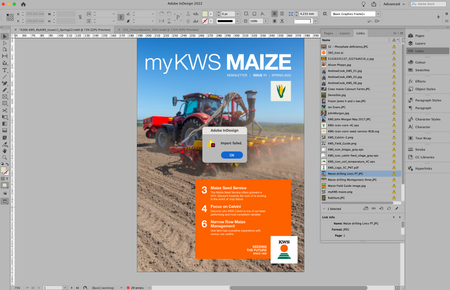
I have the same problem in InDesign with files that are only online and despair almost every day when I have to edit InDesign jobs where I have to locate the files in the Finder first and download them every time.
Now I have discovered a workaround:
- Open a job in InDesign
- Select all entries in "Links"
- Right-click on the menu item "Edit With" > "Preview 11.0".
- After all files have been opened in Preview, quit Preview.
- Switch back to InDesign.
- Continue working.
I hope this helps some of you.

Hannah Dropbox Community Moderator
3 years agoDropbox Community ModeratorHey guys, thanks for reaching out to the Dropbox Community.
We’re actively working on full support for macOS 12.3.
With this version, you may have trouble accessing online-only files in third party apps.
However, you can go to Finder and double-click to open these files.
You can read more info here.

jackiemarie37
2 years agoExplorer | Level 4
Is Dropbox still "actively" working on a solution? we're 18 months into this mess and it's costing us time and money. What is the latest update on this?
- tobiasknecht2 years agoHelpful | Level 6
Ich konnte bei uns seit Kurzem die Dropbox-Version für MacOS für File Provider installieren. Jetzt funktioniert alles wieder wie früher – endlich!
- tobiasknecht2 years agoHelpful | Level 6
I was recently able to install the Dropbox version for MacOS for File Provider. Now everything works like before - finally!
 CChesnutt2 years agoCollaborator | Level 8
This update has not been made available to my team, so, we still suffer.
About View, Download, and Export

Get support with viewing, downloading, and exporting files and folders from your Dropbox account.
The Dropbox Community team is active from Monday to Friday. We try to respond to you as soon as we can, usually within 2 hours.
If you need more help you can view your support options (expected response time for an email or ticket is 24 hours), or contact us on X, Facebook or Instagram.
For more info on available support options for your Dropbox plan, see this article.
If you found the answer to your question in this Community thread, please 'like' the post to say thanks and to let us know it was useful!


