Our Community is in read-only mode until April 8th, learn more here. You can still search existing threads or get help via Dropbox Support, the Dropbox Help Center, or Learn.
Forum Discussion

RobWilkins
3 years agoHelpful | Level 6
Broken links in InDesign files on macOS Monterey 12.3.1
Hi there,
I've been happily working with Indesign files in Dropbox for a year now where my files are all stored Online Only. It used to be the case that Dropbox would automatically relink all the s...
 3 years ago
Hello all together
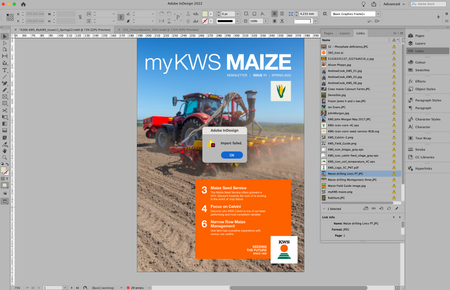
I have the same problem in InDesign with files that are only online and despair almost every day when I have to edit InDesign jobs where I have to locate the files in the Finder first and download them every time.
Now I have discovered a workaround:
- Open a job in InDesign
- Select all entries in "Links"
- Right-click on the menu item "Edit With" > "Preview 11.0".
- After all files have been opened in Preview, quit Preview.
- Switch back to InDesign.
- Continue working.
I hope this helps some of you.

Nancy Dropbox Community Moderator
2 years agoDropbox Community ModeratorHi RobWilkins, hope it’s OK to jump in here.
If you try tobiasknecht’s suggestion, and you still have trouble with this, I’d suggest reaching out to your Sales representative directly, so that they can check your Dropbox account, and help you update your Dropbox app.

Beauriz
2 years agoHelpful | Level 6
Hello,
I implemented Tobias Knecht's approach and adjusted the settings in the admin console. However, I did not uninstall Dropbox at first.
1. Dropbox got stuck while moving the data.
2. I uninstalled it manually and then reinstalled it.
3. My Dropbox client then suggested on its own to install the beta version, which I did. The moving and indexing process took about 12 hours, likely due to the amount of data.
4. It's now working, sort of. I don't have any issues with smaller documents. But as soon as there are multiple images in a document, the spinning beachball becomes my new best friend. It takes forever, and images with layers are sometimes displayed incorrectly.
Dropbox crashes at least once a day without any warning.
About View, Download, and Export

Get support with viewing, downloading, and exporting files and folders from your Dropbox account.
The Dropbox Community team is active from Monday to Friday. We try to respond to you as soon as we can, usually within 2 hours.
If you need more help you can view your support options (expected response time for an email or ticket is 24 hours), or contact us on X, Facebook or Instagram.
For more info on available support options for your Dropbox plan, see this article.
If you found the answer to your question in this Community thread, please 'like' the post to say thanks and to let us know it was useful!


