We’re Still Here to Help (Even Over the Holidays!) - find out more here.
Forum Discussion

SamPT
2 years agoHelpful | Level 7
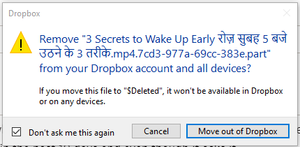
Dropbox asking to delete file after downloading it
Every time i download a file from internet and save it directly to dropbox folder ( especially when downloading videos), after the download is complete it Dropbox asks me to the following . I have cl...

SamPT
2 years agoHelpful | Level 7
No idea where ""$Deleted"." is located.
This started happening since 1 month after I uninstalled and reinstalled dropbox ( As dropbox was not connecting to internet.
FYI I again downloaded a new video file and again I got the same error, even though in last error I checked the box "Don't ask me this again" and clicked CANCEL

Megan Dropbox Community Moderator
2 years agoDropbox Community ModeratorHi SamPT, thanks for your speedy response!
Do you use any other third-party apps that might be accessing your files, along with Dropbox?
Do you choose the Dropbox folder as your location path when choosing where to save the file? If you choose a different path, and then move the content inside the folder, do you notice any difference?
- SamPT2 years agoHelpful | Level 7
Yes I gave the location path to a folder within dropbox while saving the file, and this thing happens only with video files which I save, not with any other file type.
- Megan2 years ago
Hey SamPT, which browser do you use?
Out of curiosity: would you mind trying to download a video file, using a different browser altogether, to see if you get the same results there?
- SamPT2 years agoHelpful | Level 7
tried downloading using another app name 4k video downloader, and the result is the same.
About View, download, and export

Need support with viewing, downloading, and exporting files and folders from your Dropbox account? Find help from the Dropbox Community.
The Dropbox Community team is active from Monday to Friday. We try to respond to you as soon as we can, usually within 2 hours.
If you need more help you can view your support options (expected response time for an email or ticket is 24 hours), or contact us on X, Facebook or Instagram.
For more info on available support options for your Dropbox plan, see this article.
If you found the answer to your question in this Community thread, please 'like' the post to say thanks and to let us know it was useful!


