Need to see if your shared folder is taking up space on your dropbox 👨💻? Find out how to check here.
Forum Discussion

tripbargains
2 years agoHelpful | Level 6
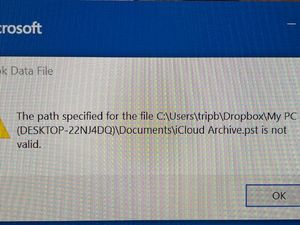
Error message when I login to my PC after I deleted something
I think I deleted something from my Dropbox account regarding my PC. Now every time I log in to PC I get this error msg. Pls help! Thank you!
Error msg
 2 years ago
those steps took me here:
But when I follow the instructions to get to New Items, More Items, Outlook Data Files I get this:
And when I open the Outlook data file pst I get this and I have no idea what I am supposed to do from here!
tripbargains
2 years agoHelpful | Level 6
Hi Walter
When I say no luck I mean I get the exact same error msg I uploaded on the first post. Otherwise everything is working fine as soon as I enter Cancel on the 2nd pic as uploaded
above.
The error msg comes up regardless of Dropbox installed on my PC. Right now I downloaded and installed and error msg still came up which is why I said no luck!
I need to fix this "iCloud Archive.pst is not valid" issue and I don't know how
I am a senior and I simply have a PC for home use so I don't know what this 3rd party app is supposed to be. I don't believe there is any such app on my PC. I just use MS Office and Google.
Mandy

Walter Dropbox Community Moderator
2 years agoDropbox Community ModeratorThanks for the additional information tripbargains
Could you send us a full page screenshot so that we can have a better visual then?
- tripbargains2 years agoHelpful | Level 6
- tripbargains2 years agoHelpful | Level 6
- Hannah2 years ago
Hey tripbargains, thanks for the screenshots.
I was able to find this, when I looked online. Can you try it and let me know if it helps?
- tripbargains2 years agoHelpful | Level 6
those steps took me here:
But when I follow the instructions to get to New Items, More Items, Outlook Data Files I get this:
And when I open the Outlook data file pst I get this and I have no idea what I am supposed to do from here!
- tripbargains2 years agoHelpful | Level 6
Hi Hannah/Walter
I did not do anything else other than what I sent below earlier. All I did was open the Outlook data.pst file as I mentioned. After that I rebooted my system twice and the error msg is no longer appearing when I open Outlook! Thanks for all your help guys!

About View, download, and export

Need support with viewing, downloading, and exporting files and folders from your Dropbox account? Find help from the Dropbox Community.
The Dropbox Community team is active from Monday to Friday. We try to respond to you as soon as we can, usually within 2 hours.
If you need more help you can view your support options (expected response time for an email or ticket is 24 hours), or contact us on X, Facebook or Instagram.
For more info on available support options for your Dropbox plan, see this article.
If you found the answer to your question in this Community thread, please 'like' the post to say thanks and to let us know it was useful!


