Your workflow is unique 👨💻 - tell us how you use Dropbox here.
Forum Discussion

MuffinMama
2 years agoNew member | Level 2
Excel File Displaying Chinese Characters.
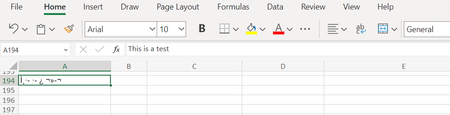
Hi All. I have a file that I edited yesterday that is now appearing online as chinese characters. If I select the cell, the correct/English version of the word appears, but not when displayed. All ot...
- 2 years ago
MuffinMama wrote:
I have a file that I edited yesterday that is now appearing online as chinese characters. If I select the cell, the correct/English version of the word appears, but not when displayed.
Those aren't Chinese characters.
This is a Microsoft issue, unrelated to Dropbox, and it's a problem with the font you're using. Change it to something other than Arial and the issue will likely go away. If you search Google you'll find many people experiencing this issue while using the web version of Office that have reported it to Microsoft.


Licoge
2 years agoExplorer | Level 3
hello, my accented characters in French have been replaced by Asian characters

Walter Dropbox Community Moderator
2 years agoDropbox Community ModeratorHi there Licoge, sorry to hear about this.
Could you send us a screenshot of where you're spotting this so that we can have a visual too?
Thanks!
- Licoge2 years agoExplorer | Level 3A few days' ago, it was correct, now accented caracters are replaced. Sée exemple below.
It's a problem with table caracter code UTF-8 or 850, I don t know how to solve it
D脙漏part Bruxelles le 14/09 15:30 avec retardDuba脙炉 apr脙篓s 6 h de vol vers 21:30Escale 3:30Vendredi 15Duba脙炉 24:30 d脙漏calage h 2:00 Avion part 脙聽 4:00 du matin plut脙麓t que 3:30 Dempesar apr脙篓s 9h de vol et un peu de retard . Plus 6:00 de d脙漏calage horaire par rapport 脙聽 Duba脙炉 Valises 脙聽 17:00.. attente de 2h.- Megan2 years ago
Hi Licoge, can you clarify the type of file this happens to?
Is this behavior consistent throughout your files, or just some of them?
 gcolinet2 years agoExplorer | Level 4Hi, it's seems it affects only thé file we are working with at the moment. It's a txt file created within Dropbox relating our trip day per day. It was written was the correct caracters but suddenly, thé french accented caracters were replaced by asian caracters. If I write something now in thé same file, it's correct.
Sée exemple below.
Problem with table code caracter
RANDO au Mont BATUR se lever tr猫s t么t 脿 1:45 .Hiru vient nous chercher 脿 2h30
6 km400 en 3h45 avec des arr锚ts et le stop au lever du soleil .
Au d茅part une petite bouteille d'eau. Et en haut 1 Pain au chocolat 4 bananes et 2 艙ufs.
Rentr茅s 脿 9 00
Piscine et resto Bale Udang Mang Engkink. Taxi. 200R puis 2 aller retour.Très bel endroit grand plutôt pour des cars

About View, Download, and Export

Get support with viewing, downloading, and exporting files and folders from your Dropbox account.
The Dropbox Community team is active from Monday to Friday. We try to respond to you as soon as we can, usually within 2 hours.
If you need more help you can view your support options (expected response time for an email or ticket is 24 hours), or contact us on X, Facebook or Instagram.
For more info on available support options for your Dropbox plan, see this article.
If you found the answer to your question in this Community thread, please 'like' the post to say thanks and to let us know it was useful!


