Need to see if your shared folder is taking up space on your dropbox 👨💻? Find out how to check here.
Forum Discussion

gary2200
4 months agoNew member | Level 2
File count differs between laptops on a specific folder
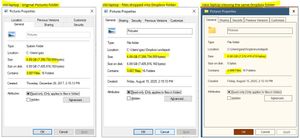
Device Lenovo P-series laptops Operating System/Browser (if using the web) (Windows 10 and 11 Dropbox App Version/Browser Version Windows File Explorer and Properties windows Question or Issue ...

Walter Dropbox Community Moderator
4 months agoDropbox Community ModeratorHey gary2200 - thanks for letting us know about this.
Can you please clarify if you're using the Dropbox desktop app on both of your computers or if you only use the website via a web browser?
Are you able to see all files on the Dropbox website in this specific folder?
Let us know more and we'll take it from there.

gary2200
4 months agoNew member | Level 2
Hi Walter, while I have the browser open (Chrome) on the Old laptop, I'm not using it for any file transfers. All transfers and viewing of directory properties are via the apps on the Old and New laptops.
I don't know about the number of files when viewed in the browser. There is a "Folder Info" option but it doesn't give me a file count or size.
- Walter4 months ago
So, am I safe to assume that you're using a web browser to do this and not the Dropbox desktop app and the Dropbox folder on your computer gary2200?
Have you tried these steps to calculate the folder's size?
- gary22004 months agoNew member | Level 2
No, the opposite. Transfers and viewing done by the apps. The folder size per File Explorer.
Yes, but the size per the Dropbox browser interface is nowhere close to the actual size. See the screenshots in my first post.
- Jay4 months ago
Hi gary2200, thanks for your post. In order to look into this matter in more detail, I'd recommend contacting the support team directly for them to investigate further.

About View, download, and export

Need support with viewing, downloading, and exporting files and folders from your Dropbox account? Find help from the Dropbox Community.
The Dropbox Community team is active from Monday to Friday. We try to respond to you as soon as we can, usually within 2 hours.
If you need more help you can view your support options (expected response time for an email or ticket is 24 hours), or contact us on X, Facebook or Instagram.
For more info on available support options for your Dropbox plan, see this article.
If you found the answer to your question in this Community thread, please 'like' the post to say thanks and to let us know it was useful!


