Your workflow is unique 👨💻 - tell us how you use Dropbox here.
Forum Discussion

LEDDesigns
4 years agoNew member | Level 2
Formatting Issues in Word Document versus Dropbox
Good Afternoon,
After speaking for several minutes with an online specialist, we determined that my issue could not be correct - which is why I ended up here per Natasha in support.
Whe...
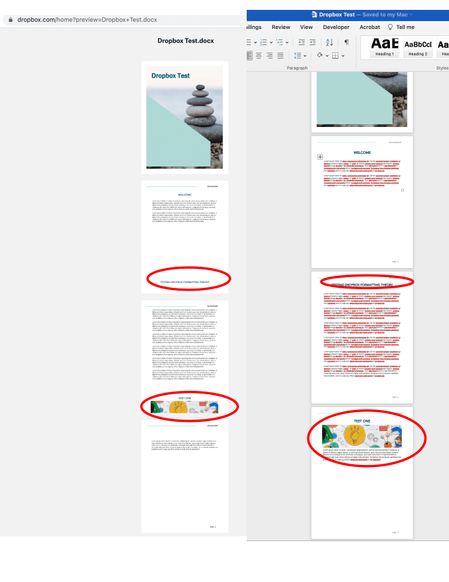
- 4 years agoHi LEDDesigns, thanks for contacting us!
In general, the Dropbox site is able to preview certain documents in the built-in previewer.
However, it isn't 100% accurate when compared to viewing a file in its native app or service, as certain features and formulae can't be parsed by the previewer, which is why the doc looks normal on Word Online.
If you want people to view the document as is, I'd recommend asking them to download the file to open in their own app so that it renders normally.
Hope this helps to clarify matters!

Jay Dropbox Community Moderator
4 years agoDropbox Community ModeratorHi LEDDesigns, thanks for contacting us!
In general, the Dropbox site is able to preview certain documents in the built-in previewer.
However, it isn't 100% accurate when compared to viewing a file in its native app or service, as certain features and formulae can't be parsed by the previewer, which is why the doc looks normal on Word Online.
If you want people to view the document as is, I'd recommend asking them to download the file to open in their own app so that it renders normally.
Hope this helps to clarify matters!
In general, the Dropbox site is able to preview certain documents in the built-in previewer.
However, it isn't 100% accurate when compared to viewing a file in its native app or service, as certain features and formulae can't be parsed by the previewer, which is why the doc looks normal on Word Online.
If you want people to view the document as is, I'd recommend asking them to download the file to open in their own app so that it renders normally.
Hope this helps to clarify matters!
About View, Download, and Export

Get support with viewing, downloading, and exporting files and folders from your Dropbox account.
The Dropbox Community team is active from Monday to Friday. We try to respond to you as soon as we can, usually within 2 hours.
If you need more help you can view your support options (expected response time for an email or ticket is 24 hours), or contact us on X, Facebook or Instagram.
For more info on available support options for your Dropbox plan, see this article.
If you found the answer to your question in this Community thread, please 'like' the post to say thanks and to let us know it was useful!


