Your workflow is unique 👨💻 - tell us how you use Dropbox here.
Forum Discussion

Ganache
4 years agoExplorer | Level 3
HELP! Dropbox has messed up my files and VM file path
Hello Dropbox Community, Thanks in advance for those willing to read through my issues and more thanks to those who can give advice. I will attempt to explain in enough detail the issues. I'm using...

Jay Dropbox Community Moderator
4 years agoDropbox Community ModeratorHi Ganache, thanks for bringing this to our attention.
It sounds like you enabled the automatic computer backup feature in the Dropbox desktop application. Could you first try disabling the computer backup from Dropbox using the steps in the above article to see if this helps?
Afterwards, you'll get the option to move the folders and files back to their previous locations, which will also delete them from the Dropbox account online.
Keep me updated with any progress!
It sounds like you enabled the automatic computer backup feature in the Dropbox desktop application. Could you first try disabling the computer backup from Dropbox using the steps in the above article to see if this helps?
Afterwards, you'll get the option to move the folders and files back to their previous locations, which will also delete them from the Dropbox account online.
Keep me updated with any progress!
 Ganache4 years agoExplorer | Level 3
Hi Jay,
I appreciate your help. I read the instructions on how to 'Turn off Backup' but my screen doesn't seem to follow the instructions?
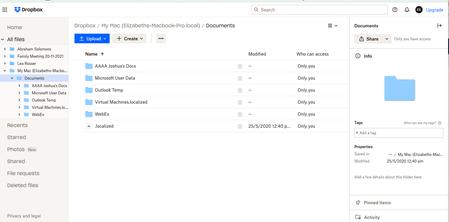
Attached are screenshots showing;
Backup screen - I'm assuming it's NOT setup to backup?
then after clicking on Backup screen Set up button - I unchecked all the boxes, but when I go back in the boxes are still checked???
If it is that Dropbox is not backing up, then how do I disconnect my mac from dropbox and get back to before ie no Dropbox showing in finder?
This whole thing has caused problems with my VM as the pathway was through Dropbox and I must have deleted the windows file. I want to get back to before Dropbox inserted itself in file paths.
I'm thinking that after I sort the Dropbox backup and remove Dropbox app (? assuming that will restore old file paths) that I restore ALL my files and apps from 6 Jan (before the first dropbox file delete). But if I Dropbox started backing up before 6 Jan, would that restore Dropbox too? I feel like I'm in a time loop with all this! This is all making me very upset. It's so hard to sort this over messages. Is there anyway to find out when Dropbox backup started?
- Megan4 years agoHi Ganache, how are you today?
You can't directly see when the feature was enabled. However, you can have a look at your events page.
The Events page gives you an overview of all activity in your account, including file events (adds, edits, and deletes), as well as adding or removing shared folders.
This way, you can see when the files were synced with the web.
As for your screenshots, it seems that they haven't been attached along with your reply. Can you try again?- Ganache4 years agoExplorer | Level 3
Hi Megan!
Oops, I've attached all the screenshots from the previous message.
And thank you for the Events tip! I've looked at can see Dropbox was added 7 Jan 2022 - screenshot attached.
I'm thinking...perhaps I could restore all files and apps from Mac Time Machine 6 Jan 2022, BEFORE I added Dropbox
Would I still need to do anything with Dropbox?

About View, Download, and Export

Get support with viewing, downloading, and exporting files and folders from your Dropbox account.
The Dropbox Community team is active from Monday to Friday. We try to respond to you as soon as we can, usually within 2 hours.
If you need more help you can view your support options (expected response time for an email or ticket is 24 hours), or contact us on X, Facebook or Instagram.
For more info on available support options for your Dropbox plan, see this article.
If you found the answer to your question in this Community thread, please 'like' the post to say thanks and to let us know it was useful!


