Our Community is in read-only mode until April 8th, learn more here. You can still search existing threads or get help via Dropbox Support, the Dropbox Help Center, or Learn.
Forum Discussion

MPM
2 years agoExplorer | Level 4
How to move my main folder back to the Dropbox folder
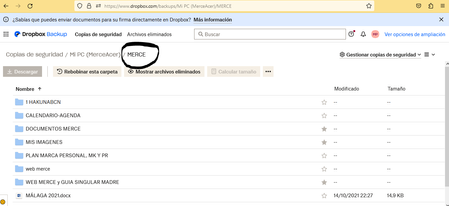
Hello, for some reason I suddenly find my main Folder (MERCE) in the Backup Folder, instead of being located as before inside Dropbox. C:\users\***\dropbox\MERCE (before it was like this), see below...
- 2 years ago
Hey MPM! Hope it’s OK to jump in here.
When backing up your computer folders to Dropbox (Desktop/Downloads/Documents), what’s happening is that these folders are moved within your Dropbox directory, so any changes you make are directly synced and backed up to your Dropbox account (so there’s only one copy of them).
When disabling backup, you basically stop syncing them to Dropbox, and you can also choose to move them back to their original locations on your device.
Hope that helps!


Megan Dropbox Community Moderator
2 years agoDropbox Community ModeratorHey there, MPM, thanks for posting here today!
Can you clarify what the path is for your Dropbox folder, when accessing your app's preferences?
Do you get any errors when trying to move the folder, outside of your Backup?
Keep me posted, and we'll take it from there!
MPM
2 years agoExplorer | Level 4
Hi Megan
Thank you for your support.
Please see here the path in preferences and down where my folders are now (in the Backup under MyPC (MerceAcer)
I did try some weeks ago to move my main folder MERCE intro dropbox but after a while a message popped up saying something I cannot remember.
I did not dare to try again, but I will try again and let you know.
Below the path:
Thank you for helping me.
- Megan2 years ago
Hi MPM, thanks for the screenshots!
So, on the first screenshot you can see the path of your Dropbox folder, where it is located inside your computer.
On the second screenshot, it looks like we're referring to your Computer Backup, and the name of the actual device, hence you see the name there.
If you wish, you can disable Backup, and just keep a copy of the content, inside your Dropbox folder instead.
- MPM2 years agoExplorer | Level 4
Hi Megan,
Thank you, your solution is what I would like, but I'm afraid that if I disable the backup I may loose all the information because i will not have a back up.
Or should I first do a copy of the information in the Backup?
Or is it that when I disable the backup this information moves to the path in the 1st screenshot?
I have a confusion also: We can see the information in the Backup but why I cannot see the original information somewhere and only the backup?
Sorry with this bombarding questions but with your help I start to see a closer solution but still have some things I don't really understand.
About View, Download, and Export

Get support with viewing, downloading, and exporting files and folders from your Dropbox account.
The Dropbox Community team is active from Monday to Friday. We try to respond to you as soon as we can, usually within 2 hours.
If you need more help you can view your support options (expected response time for an email or ticket is 24 hours), or contact us on X, Facebook or Instagram.
For more info on available support options for your Dropbox plan, see this article.
If you found the answer to your question in this Community thread, please 'like' the post to say thanks and to let us know it was useful!


