We’re Still Here to Help (Even Over the Holidays!) - find out more here.
Forum Discussion

Matthewg
3 years agoNew member | Level 2
I can't open the saved email messages on my Samsung device
Hi, I have put the dropbox app on my Samsung S23.
I have saved email messages on my desktop computer that back up to dropbox.
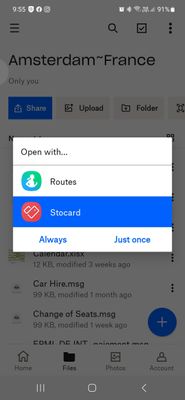
When i try and open the .msg file on my phone they will not open....

Matthewg
3 years agoNew member | Level 2
I tried saving the email to my phone, but it still wont open.
I get a message saying that there are no programs that will open this type of file...
On my computer the email extension is *.msg
On my phone the email extension is *.eml
I tried changing the extension to the one that i saved to the phone from msg to eml... i was able to open it, but it was not formated correctly and no attachments were present..

Megan Dropbox Community Moderator
3 years agoDropbox Community ModeratorHi Matthewg, you need to have an app installed on the device that is capable of opening these type of files, since they can't open directly from Dropbox.
Do you have an app on the phone that is capable of opening .eml mail files? if so, have you tried opening such a file separately from Dropbox?
The first step is to make sure you can open .eml or .msg files outside of Dropbox. Keep in mind that, we can't provide any specific recommendations, but you can try searching on the app store for 'eml viewer' to see if any apps appear which might be able to help you with with this.
About View, download, and export

Need support with viewing, downloading, and exporting files and folders from your Dropbox account? Find help from the Dropbox Community.
The Dropbox Community team is active from Monday to Friday. We try to respond to you as soon as we can, usually within 2 hours.
If you need more help you can view your support options (expected response time for an email or ticket is 24 hours), or contact us on X, Facebook or Instagram.
For more info on available support options for your Dropbox plan, see this article.
If you found the answer to your question in this Community thread, please 'like' the post to say thanks and to let us know it was useful!


