Our Community is in read-only mode until April 8th, learn more here. You can still search existing threads or get help via Dropbox Support, the Dropbox Help Center, or Learn.
Forum Discussion

Stanley777
5 months agoExplorer | Level 3
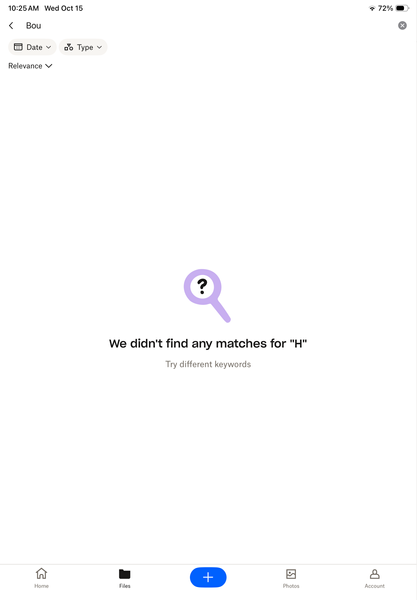
iOS search says H not found no matter what I search for.

Megan Dropbox Community Moderator
5 months agoDropbox Community ModeratorHey Stanley777, welcome to our Community!
I've just tested this on my device and everything seems to work okay on my end.
Have you tried to clear the app's cache from the settings, to see if that helps?
Also, have you tried another WiFi network or searching for an item in a specific folder while you're connected to cellular data? How about rebooting your device? Maybe that will do the trick.
If none of that works, would you mind clarifying your iPhone's OS, along with the Dropbox mobile version that you're using?
Keep me posted and we'll go from there.
About View, Download, and Export

Get support with viewing, downloading, and exporting files and folders from your Dropbox account.
The Dropbox Community team is active from Monday to Friday. We try to respond to you as soon as we can, usually within 2 hours.
If you need more help you can view your support options (expected response time for an email or ticket is 24 hours), or contact us on X, Facebook or Instagram.
For more info on available support options for your Dropbox plan, see this article.
If you found the answer to your question in this Community thread, please 'like' the post to say thanks and to let us know it was useful!


