Our Community is in read-only mode until April 8th, learn more here. You can still search existing threads or get help via Dropbox Support, the Dropbox Help Center, or Learn.
Forum Discussion

RobWilkins
3 years agoHelpful | Level 6
Most of my files are showing as Zero bytes on desk top app
Most of my files are showing as Zero bytes on desk top app and will not open – Why? Mac OS Monterey 12.3.1 This problem has only started happening in the last couple of days. I've been happily...
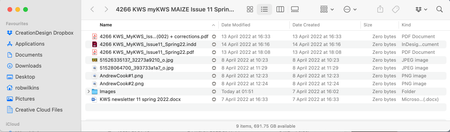
- 3 years ago
Are you using SmartSync?
If so download them first and then they will open 🙂


Trey H.
3 years agoNew member | Level 2
Have have the same issue, and I Mark's (SuperUser) comment about SmartSync is not applicable/helpful (yet somehow it is listed as the "accepted solution". Have have 50k+ files, and most are reading Zero bytes on the desktop. Have reinstalled the Dropbox desktop app, un-sync'd and re-sync'd the files in question, restarted Dropbox, and restarted the Macbook. Nothing. Has never been the case before. Incredibly frustrating. Hard to believe that we havent had a Dropbox employee assist with this question thread.
Trey H.
3 years agoNew member | Level 2
I found a workaround of sorts that I will share now. The end result is that my files still do not automatically sync offline to my desktop (though that is the setting), but at least now I can open them directly in Finder (something I was not able to do prior to this fix).
 Ananda132 years agoExplorer | Level 4
Just chiming in here to say I had the same problem and then I right-clicked the main folder (from my Mac) and selected "make available offline" and that seemed to fix the issue and now all the files are actually on my desktop too.
About View, Download, and Export

Get support with viewing, downloading, and exporting files and folders from your Dropbox account.
The Dropbox Community team is active from Monday to Friday. We try to respond to you as soon as we can, usually within 2 hours.
If you need more help you can view your support options (expected response time for an email or ticket is 24 hours), or contact us on X, Facebook or Instagram.
For more info on available support options for your Dropbox plan, see this article.
If you found the answer to your question in this Community thread, please 'like' the post to say thanks and to let us know it was useful!


