Your workflow is unique 👨💻 - tell us how you use Dropbox here.
Forum Discussion

GPaul
4 months agoHelpful | Level 5
My local files won't open. I can see them in the Dropbox folder, but can't preview them.
Unable to access my files on DropBox!
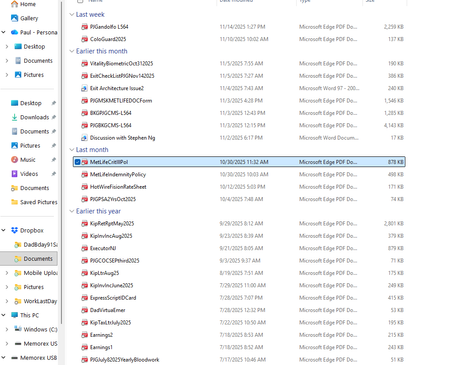
Have had a DB account shared between a work laptop + my personal laptop (both Win 11 + fairly new) for quite some time. Recently retired-Work laptop went away...
 3 months ago
Folks-
Thought I replied already-but it seems not. Anyway-thanks very much to you all for all the help, it seems the problem has been resolved.
GPaul
4 months agoHelpful | Level 5
Walter,
Here is the SYNC info from under PREFERENCES
When I FIRST had this problem-it told me to SWITCH FROM ONLINE-ONLY
TO AVAILABLE OFFLINE soo I tried to do that to no avail
Thanks again + PLEASE HELP ME I NEED THOSE FILES TRAPPED IN LIMBO SOMEWHERE

Nancy Dropbox Community Moderator
4 months agoDropbox Community ModeratorHi from me as well, GPaul!
The window you're looking at is to change the default sync preferences of your files, so updating that will only apply to future files and not the current syncing status of your existing ones.
If you open your File Explorer once again and go to your Dropbox files there, do they still have a grey cloud icon next to them? If they do, it means that they’re still online-only, which is why Megan suggested making them available offline instead.
What I'd like you to do in that case is to right-click on one of them and select the option “Make available offline”; the syncing icon of the file should switch to a green checkmark instead. Can you open the file after that?
About View, Download, and Export

Get support with viewing, downloading, and exporting files and folders from your Dropbox account.
The Dropbox Community team is active from Monday to Friday. We try to respond to you as soon as we can, usually within 2 hours.
If you need more help you can view your support options (expected response time for an email or ticket is 24 hours), or contact us on X, Facebook or Instagram.
For more info on available support options for your Dropbox plan, see this article.
If you found the answer to your question in this Community thread, please 'like' the post to say thanks and to let us know it was useful!


