Your workflow is unique 👨💻 - tell us how you use Dropbox here.
Forum Discussion

Ilkuul
3 years agoExplorer | Level 4
Newly uploaded files not sorted correctly
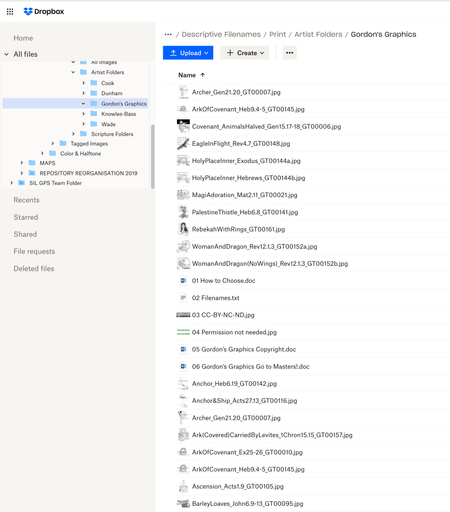
I have just uploaded 11 new files to a Dropbox folder, and they seem to be stuck at the top of the list: they are not sorting alphabetically with the rest of the files.
I have tried changing the so...
- 3 years ago
Ilkuul wrote:
I have just uploaded 11 new files to a Dropbox folder, and they seem to be stuck at the top of the list: they are not sorting alphabetically with the rest of the files.
Best guess, the files have a whitespace character at the beginning of each filename. In the screenshot below, the Test.txt file has a non-breaking space at the beginning of the name, so it sorts to the top of the list.

Rich Super User II
3 years agoSuper User II
Ilkuul wrote:
I have just uploaded 11 new files to a Dropbox folder, and they seem to be stuck at the top of the list: they are not sorting alphabetically with the rest of the files.
Best guess, the files have a whitespace character at the beginning of each filename. In the screenshot below, the Test.txt file has a non-breaking space at the beginning of the name, so it sorts to the top of the list.

Ilkuul
3 years agoExplorer | Level 4
That was it! The last thing I would have guessed, but you spotted it. I used a bulk renamer to strip prefixes off those filenames, and it left the following space behind. Many thanks!
About View, Download, and Export

Get support with viewing, downloading, and exporting files and folders from your Dropbox account.
The Dropbox Community team is active from Monday to Friday. We try to respond to you as soon as we can, usually within 2 hours.
If you need more help you can view your support options (expected response time for an email or ticket is 24 hours), or contact us on X, Facebook or Instagram.
For more info on available support options for your Dropbox plan, see this article.
If you found the answer to your question in this Community thread, please 'like' the post to say thanks and to let us know it was useful!


