Need to see if your shared folder is taking up space on your dropbox 👨💻? Find out how to check here.
Forum Discussion

manelbarros
3 years agoExplorer | Level 3
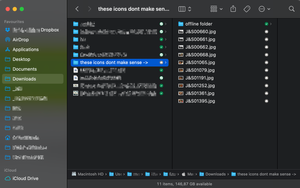
Online-Only icon in folder with local files inside.
Today (2023-Jun-16) my dropbox still gives me these icons and it's impossible to know where the "Offline files" are. I remember, last year, that this was not a problem and when a folder had Online an...

Jay Dropbox Community Moderator
3 years agoDropbox Community ModeratorHi manelbarros, these changes to the Mac OS version of the Dropbox desktop application were implemented last year.
Previously, online-only files would only take zero bytes on the machine if the 'Online-only files on Mac' was enabled on this page. If it was not enabled, then it would show their original size.

manelbarros
3 years agoExplorer | Level 3
Hello Jay,
Ok so that "issue" with the new icons, is there any possibility that Dropbox revert the decision back to the previous icons?
Regarding the zero-bytes, why does that solution stopped working? Because either if i turned it ON or OFF it continues to show "zero bytes".
And yes, I restarted the Dropbox desktop app, I restarted my computer and my Dropbox is up to date...
- Jay3 years ago
The icons are part of the newer version of the Dropbox desktop application as required by the Mac OS itself, so they cannot be reverted.
Likewise with the zero bytes, this would then be changed with the newer version of the app.
- manelbarros3 years agoExplorer | Level 3
So, there's no solution to either one of the two questions..?!
- Jay3 years ago
If you're on the newer version of the Dropbox desktop application for Mac OS, which will be the default for all Mac users running 12.5 or later when the rollout is completed, then there isn't a workaround for the changes to the app.
About View, download, and export

Need support with viewing, downloading, and exporting files and folders from your Dropbox account? Find help from the Dropbox Community.
The Dropbox Community team is active from Monday to Friday. We try to respond to you as soon as we can, usually within 2 hours.
If you need more help you can view your support options (expected response time for an email or ticket is 24 hours), or contact us on X, Facebook or Instagram.
For more info on available support options for your Dropbox plan, see this article.
If you found the answer to your question in this Community thread, please 'like' the post to say thanks and to let us know it was useful!


