We’re Still Here to Help (Even Over the Holidays!) - find out more here.
Forum Discussion

SistemasMVH1
4 years agoExplorer | Level 3
Orange box icon meaning
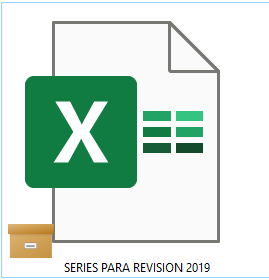
What does this orange box icon means? I'm on desktop, windows 11.


Nancy Dropbox Community Moderator
4 years agoDropbox Community ModeratorHey DG111, sorry to jump in here.
I did a little bit of research and from what I could find, this icon is related to some file attributes on Windows 11.
Can you please clarify if you’re able to open these files, or if they give any kind of error when trying to do so?

DG111
4 years agoHelpful | Level 5
Problem Solved 👏
Hi Nancy, I finally worked it out. It is definitely a Onedrive icon. Disabling Onedrive was not enough to get rid of the icon on the files. I had to actually uninstall it and do a restart. The icon on my files is now gone.
Just a note to anyone that is doing this to be aware that this will remove your Onedrive files from your computer but it is still available in the cloud. Maybe copy the files first just to be safe.
Thank you for trying to assist me with this 😀
- Nancy4 years ago
I’m really glad to hear you were able to sort this out!
If you need something else, we’re here for you.
Have a great rest of your week!
 thartgrove4 years agoNew member | Level 2
FYI uninstalling and deleting One Drive completely does not prevent this icon from continuing to show up. It still puts itself on files i've recently accessed, especially image files (jpg, png, etc...). It doesn't affect the file from being opened, but I do have a ton of issues with image thumbnails not showing up, especially in the camera uploads folder.
I'm on Windows 11. It makes me think WIndows 11 still grabs your files somehow, regardless of location and syncs them with one drive, even after One Drive completely deleted. Sketchy stuff.
 propertyexplorations3 years agoExplorer | Level 4
I read several of the entries, trying to get rid of the file box on all my dropbox files, because it's super annoying that you can't open your files unless you're online. I didn't see the solution, but I found one.
If the dropbox logo is in the bottom right corner near the time (Windows) right click it, then when the pop up comes up click on your initials in the top right corner, a drop down box will open and click on preferences. A new window will pop up for dropbox preferences, click on the sync tab. There is a section that says "save hard drive space automatically" yes or no. I had no checked, which is what you want, but then there is a drop down selection to the right that allows you to choose "available offline" or "online-only" choose available offline. I had online-only selected and as soon as I switched it to available offline all the little boxes went away.
There maybe another way to get to dropbox preferences, above is how I found it.
 Nickelplate2 years agoExplorer | Level 4
I've uninstalled OneDrive and the briefcase icons remain. I'm also not getting any Dropbox options when I right-click a folder or file. I'm unable to request files for keeping offline, and all other context menu options are missing.
- Mark2 years ago
Super User II
Nickelplate wrote:
I've uninstalled OneDrive and the briefcase icons remain. I'm also not getting any Dropbox options when I right-click a folder or file. I'm unable to request files for keeping offline, and all other context menu options are missing.
The icon is from OneDrive, so, if its still there its an issue with OneDrive's uninstall from the system.
In terms of context menus that USUALLY means Dropbox isn't installed OR it isn't running.
Try to redownload from www.dropbox.com/downloading
 rosempryor4 years agoExplorer | Level 3
How do I get rid of this icon. I understand it's a One Drive icon. How do I know what files are in the one drive cloud and which are on my computer? And how do I download them all to my computer before disabling one drive?
Should I disable one drive? Can I run dropbox and one drive on the same computer?
thanks.
- Rich4 years ago
rosempryor wrote:
Can I run dropbox and one drive on the same computer?
Yes, you can run both OneDrive and Dropbox on the same computer. You just can't have them both syncing the same files. Both Dropbox and OneDrive have the ability to sync or backup your key folders such as Desktop, Documents, etc. If you activate that feature in both, you'll likely have issues as the two programs try to sync the same files.
As for your other questions, that's not really anything that we can answer here. You'll be better off asking on Microsoft's support forum.
 Frank m4 years agoExplorer | Level 3
Hi
How do i delete one drive to test this out? I have not made any changed to my computer that i am aware of, and today i now have all these box symbols on my dropbox files and con not open them.
Thanks
- Walter4 years ago
Hey Frank m, how are you today?
I just wanted to mention that I found this article which I believe will help with what you had in mind.
Let us know if you have any other questions.
- Patroklus3 years agoNew member | Level 2
Thank you for posting. This saved me a great deal of time. I was exceedingly frustrating to not being able to open the files. I disabled the computer from one-drive and everything seems to be working OK now.
- Kevin-542 years agoExplorer | Level 4
I've been struggling with these orange boxes for months. Per this thread, I uninstalled OneDrive and restarted my computer. Problem persisted. If I copy a folder to my laptop, the icon disappears from any file in the foldere. If I put the folder back into Dropbox, the icon reappears and causes me to get an error message when trying to open the file. What next?
- propertyexplorations2 years agoExplorer | Level 4
If the dropbox logo is in the bottom right corner near the time (Windows) right click it, then when the pop up comes up click on your initials in the top right corner, a drop down box will open and click on preferences. A new window will pop up for dropbox preferences, click on the sync tab. There is a section that says "save hard drive space automatically" yes or no. I had no checked, which is what you want, but then there is a drop down selection to the right that allows you to choose "available offline" or "online-only" choose available offline. I had online-only selected and as soon as I switched it to available offline all the little boxes went away.
- Kevin-542 years agoExplorer | Level 4
Definitely uninstalled OneDrive - I double checked this morning.
Thanks for the suggestions regarding checking my sync options but the options you mentioned do not show up in the drop down menu. I did check to see if any files were set to 'selective sync' and none were.
- MarinRob2 years agoNew member | Level 2
This problem just occurred on my computer. I first disabled and then uninstalled OneDrive and restarted my computer. However, this had no effect: I still have the filebox icon superimposed on the lower left of my files, and they will not open. Do you have any other suggestions?


About View, download, and export

Need support with viewing, downloading, and exporting files and folders from your Dropbox account? Find help from the Dropbox Community.
The Dropbox Community team is active from Monday to Friday. We try to respond to you as soon as we can, usually within 2 hours.
If you need more help you can view your support options (expected response time for an email or ticket is 24 hours), or contact us on X, Facebook or Instagram.
For more info on available support options for your Dropbox plan, see this article.
If you found the answer to your question in this Community thread, please 'like' the post to say thanks and to let us know it was useful!


