Need to see if your shared folder is taking up space on your dropbox 👨💻? Find out how to check here.
Forum Discussion

SistemasMVH1
4 years agoExplorer | Level 3
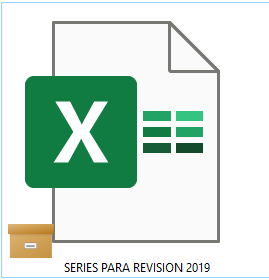
Orange box icon meaning
What does this orange box icon means? I'm on desktop, windows 11.


DG111
4 years agoHelpful | Level 5
Problem Solved 👏
Hi Nancy, I finally worked it out. It is definitely a Onedrive icon. Disabling Onedrive was not enough to get rid of the icon on the files. I had to actually uninstall it and do a restart. The icon on my files is now gone.
Just a note to anyone that is doing this to be aware that this will remove your Onedrive files from your computer but it is still available in the cloud. Maybe copy the files first just to be safe.
Thank you for trying to assist me with this 😀
Kevin-54
2 years agoExplorer | Level 4
I've been struggling with these orange boxes for months. Per this thread, I uninstalled OneDrive and restarted my computer. Problem persisted. If I copy a folder to my laptop, the icon disappears from any file in the foldere. If I put the folder back into Dropbox, the icon reappears and causes me to get an error message when trying to open the file. What next?
 propertyexplorations2 years agoExplorer | Level 4
If the dropbox logo is in the bottom right corner near the time (Windows) right click it, then when the pop up comes up click on your initials in the top right corner, a drop down box will open and click on preferences. A new window will pop up for dropbox preferences, click on the sync tab. There is a section that says "save hard drive space automatically" yes or no. I had no checked, which is what you want, but then there is a drop down selection to the right that allows you to choose "available offline" or "online-only" choose available offline. I had online-only selected and as soon as I switched it to available offline all the little boxes went away.
- Kevin-542 years agoExplorer | Level 4
Definitely uninstalled OneDrive - I double checked this morning.
Thanks for the suggestions regarding checking my sync options but the options you mentioned do not show up in the drop down menu. I did check to see if any files were set to 'selective sync' and none were.


About View, download, and export

Need support with viewing, downloading, and exporting files and folders from your Dropbox account? Find help from the Dropbox Community.
The Dropbox Community team is active from Monday to Friday. We try to respond to you as soon as we can, usually within 2 hours.
If you need more help you can view your support options (expected response time for an email or ticket is 24 hours), or contact us on X, Facebook or Instagram.
For more info on available support options for your Dropbox plan, see this article.
If you found the answer to your question in this Community thread, please 'like' the post to say thanks and to let us know it was useful!


