Need to see if your shared folder is taking up space on your dropbox 👨💻? Find out how to check here.
Forum Discussion

SistemasMVH1
4 years agoExplorer | Level 3
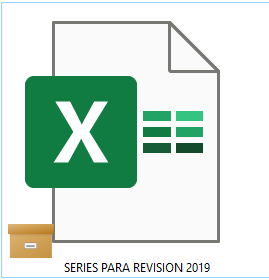
Orange box icon meaning
What does this orange box icon means? I'm on desktop, windows 11.


Kevin-54
2 years agoExplorer | Level 4
The issue at hand, is the exact same issue Dropbox support spent more than a month attempting to resolve before coming to the conclusion the problem wasn't specifically related to Dropbox but to another extension, app or program on my laptop and closing the ticket.
In the meantime, I had read this thread, assumed it was OneDrive and uninstalled it. Then I uninstalled Dropbox and reinstalled it - all to no avail. Is there ANY chance I'll get better support if I open another ticket? After all, at least 5 people were involved last time.
As to your suggestion to create a new OS profile on my laptop - I have absolutely NO idea how to go about doing that, much less how to open Dropbox using the new profile if I could figure out how to do it.
. (The whole reason I removed OneDrive).

Nancy Dropbox Community Moderator
2 years agoDropbox Community ModeratorHope it’s OK to jump in here, Kevin-54.
To create a new user profile on your computer, you can follow these steps.
Other than that, I can suggest checking out this suggestion to make sure the Dropbox overlay icons are prioritized and see if the other icon will disappear after following them.
About View, download, and export

Need support with viewing, downloading, and exporting files and folders from your Dropbox account? Find help from the Dropbox Community.
The Dropbox Community team is active from Monday to Friday. We try to respond to you as soon as we can, usually within 2 hours.
If you need more help you can view your support options (expected response time for an email or ticket is 24 hours), or contact us on X, Facebook or Instagram.
For more info on available support options for your Dropbox plan, see this article.
If you found the answer to your question in this Community thread, please 'like' the post to say thanks and to let us know it was useful!


