Our Community is in read-only mode until April 8th, learn more here. You can still search existing threads or get help via Dropbox Support, the Dropbox Help Center, or Learn.
Forum Discussion

james_sb
8 years agoNew member | Level 2
Why won't a video from my Dropbox account save to my iPhone?
I am trying to export an MP4 from my Dropbox to my Iphone 6c iOS 10.3.3 but am
repeatedly getting the 'sorry this type of video cannot be saved to this device'.
Have searched around the inter...
 8 years ago
Having the same issue, I'm using an iPhone 5SE 64GB.
The file size I have is 88MB. Something that size has never been an issue to download from Dropbox before.
The Export process completes but right at the end it doesn't save but instead shows the error message. I've favorited the link on my phone, but I can't get it to store locally on my phone.
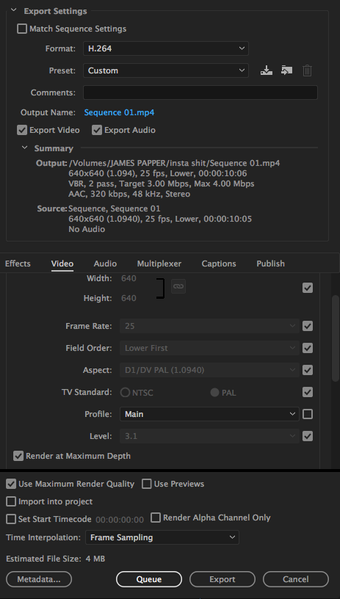
I was only able to download when I re-exported at the settings in the screenshot
richalhoub
8 years agoNew member | Level 2
Having the same issue, I'm using an iPhone 5SE 64GB.
The file size I have is 88MB. Something that size has never been an issue to download from Dropbox before.
The Export process completes but right at the end it doesn't save but instead shows the error message. I've favorited the link on my phone, but I can't get it to store locally on my phone.
I was only able to download when I re-exported at the settings in the screenshot

snickerdoodle
7 years agoNew member | Level 2
How do you go to the "export setting" page? I am having the same issue, but I cant figure out how to change the export settings since I cant find the page.
richalhoubwrote:Having the same issue, I'm using an iPhone 5SE 64GB.
The file size I have is 88MB. Something that size has never been an issue to download from Dropbox before.
The Export process completes but right at the end it doesn't save but instead shows the error message. I've favorited the link on my phone, but I can't get it to store locally on my phone.
I was only able to download when I re-exported at the settings in the screenshot
 audreyh687 years agoNew member | Level 2
I am having the same exact issue. I am trying to export an MP4 file from a GoPro, from my DropBox to my phone. I keep getting the same "Sorry this type of video cannot be saved to this device" message. Even when I try and export from DropBox to iMovie, iMovie then gives me a similar message. So I came out there, found this solution, yet I can't figure out how to get to my settings on either my phone or from my laptop, in Dropbox, to adjust export settings. This is one of the most frustrating things I've ever dealt with.
About View, Download, and Export

Get support with viewing, downloading, and exporting files and folders from your Dropbox account.
The Dropbox Community team is active from Monday to Friday. We try to respond to you as soon as we can, usually within 2 hours.
If you need more help you can view your support options (expected response time for an email or ticket is 24 hours), or contact us on X, Facebook or Instagram.
For more info on available support options for your Dropbox plan, see this article.
If you found the answer to your question in this Community thread, please 'like' the post to say thanks and to let us know it was useful!


