We’re Still Here to Help (Even Over the Holidays!) - find out more here.
Forum Discussion

II11
3 years agoNew member | Level 2
Word documents corrupting or missing after working on them and saving them to Dropbox
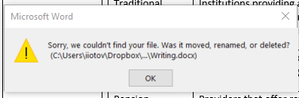
When I open a Word document, work on it and save it to my Dropbox, it disappears, and I cannot reopen it. It is not in my deleted items/trash, nor have I moved it. I get the following error message: ...

Walter Dropbox Community Moderator
3 years agoDropbox Community ModeratorHi there II11, sorry to hear you're having issues with this.
Could it be that your file's path is very long, thus causing this error from Windows?
As for the files you notice being created, I'd assume that these are temp files that are created as a fail-safe while you're syncing them.
Do you get the same results if you do this with syncing paused or with the Dropbox desktop app completely closed?
When it comes to your lost work on one of those files, could you check your events page or the file's version history to see if you can restore from there?
Let us know of any updates!
 II113 years agoNew member | Level 2
Hi Walter,
The file length is not very long (<20 characters)
This happens when DropBox desktop app is completely closed. Not sure about syncing being paused.
There are no files in my Events section, nor can I do anything about version history as the file is completely gone - so there is no "file version" to go back on. This is hugely concerning.
Please help.

About View, download, and export

Need support with viewing, downloading, and exporting files and folders from your Dropbox account? Find help from the Dropbox Community.
The Dropbox Community team is active from Monday to Friday. We try to respond to you as soon as we can, usually within 2 hours.
If you need more help you can view your support options (expected response time for an email or ticket is 24 hours), or contact us on X, Facebook or Instagram.
For more info on available support options for your Dropbox plan, see this article.
If you found the answer to your question in this Community thread, please 'like' the post to say thanks and to let us know it was useful!


