Your workflow is unique 👨💻 - tell us how you use Dropbox here.
Forum Discussion

ken_804
1 year agoExplorer | Level 3
A folder has disappeared after I created it in a general folder & needed it instead in a sub-folder.
I have an issue with a folder that has disappeared after I mistakenly created it in a general folder and needed it instead in a subfolder. I am running Sonoma 14.5 on a Mac Mini M1. After I realized...

ken_804
1 year agoExplorer | Level 3
Hi Hannah
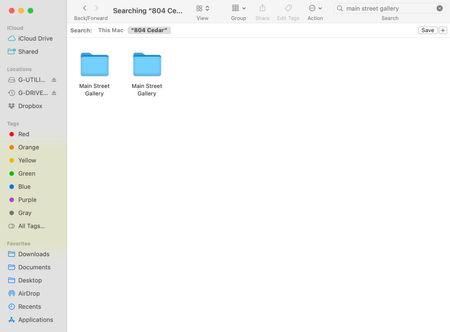
Well understood but I did not move it once, no less three times. In any event, this is not the problem I am reporting. If you scroll above, you see there are two "Main Street Gallery" folders showing in "804 Cedar." Upon opening 804 Cedar, there is only one folder named Main Street Gallery (second screen shot from the top). Where is the phantom folder? How can folders get lost like this?


About Delete, Edit, and Organize
Solve issues with deleting, editing, and organizing files and folders in your Dropbox account.
The Dropbox Community team is active from Monday to Friday. We try to respond to you as soon as we can, usually within 2 hours.
If you need more help you can view your support options (expected response time for an email or ticket is 24 hours), or contact us on X, Facebook or Instagram.
For more info on available support options for your Dropbox plan, see this article.
If you found the answer to your question in this Community thread, please 'like' the post to say thanks and to let us know it was useful!


