Your workflow is unique 👨💻 - tell us how you use Dropbox here.
Forum Discussion

Briskola
3 years agoCollaborator | Level 8
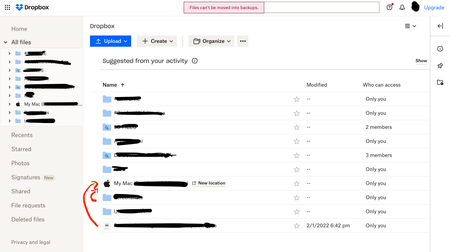
Cannot move files between dropbox and Backup
Hello, before I did it quietly, but since the transition to Dropbox Backup took place, through the web page it is no longer possible to transfer dropbox files and put them in the backup folders or vi...

Rich Super User II
3 years agoSuper User II
Briskola wrote:
... it is no longer possible to transfer dropbox files and put them in the backup folders ...
It makes sense to me that a backup is meant to be just that; a backup of the files as they exist on the device being backed up. You shouldn't be able to modify the content of a backup. Seems that would defeat the intent.
If you need files backed up, move them into the folders being backed up on your computer so Dropbox can sync/back them up as intended.

Briskola
3 years agoCollaborator | Level 8
Yes it's true but before now you could do it and it was even more convenient since you put the file directly into the folder you wanted instead of putting it first in the Dropbox one and then in the Documents folder for example.
- Walter3 years ago
Dropbox Community Moderator
Hey Briskola, thanks for your feedback on this - it's been noted in our system.
Let us know if you have anything else to add.
- Briskola3 years agoCollaborator | Level 8
Nope, this is the situation, I'd like to modify backed up folder from the web too like before this changes, since it now redirect to the relative Dropbox Backup page when I open a backed up folder
- Jay3 years ago
Hi Briskola, currently it isn't possible to modify any files in the backup from the Dropbox site.
This can only be done when changing the files directly on your machine, which will then sync to that backup with the changes.
Your feedback and comments are greatly appreciated!


About Delete, Edit, and Organize
Solve issues with deleting, editing, and organizing files and folders in your Dropbox account.
The Dropbox Community team is active from Monday to Friday. We try to respond to you as soon as we can, usually within 2 hours.
If you need more help you can view your support options (expected response time for an email or ticket is 24 hours), or contact us on X, Facebook or Instagram.
For more info on available support options for your Dropbox plan, see this article.
If you found the answer to your question in this Community thread, please 'like' the post to say thanks and to let us know it was useful!


