Your workflow is unique 👨💻 - tell us how you use Dropbox here.
Forum Discussion

Briskola
3 years agoCollaborator | Level 8
Cannot move files between dropbox and Backup
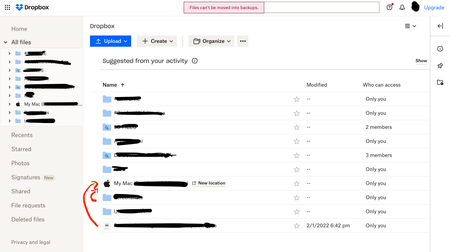
Hello, before I did it quietly, but since the transition to Dropbox Backup took place, through the web page it is no longer possible to transfer dropbox files and put them in the backup folders or vi...

Walter Dropbox Community Moderator
3 years agoDropbox Community ModeratorHey Briskola, thanks for your feedback on this - it's been noted in our system.
Let us know if you have anything else to add.

Briskola
3 years agoCollaborator | Level 8
Nope, this is the situation, I'd like to modify backed up folder from the web too like before this changes, since it now redirect to the relative Dropbox Backup page when I open a backed up folder
- Jay3 years ago
Hi Briskola, currently it isn't possible to modify any files in the backup from the Dropbox site.
This can only be done when changing the files directly on your machine, which will then sync to that backup with the changes.
Your feedback and comments are greatly appreciated!
 sadlkfjbba3 years agoNew member | Level 2
I've been a paying customer for many years and the removal of this function is rediculus.
I'll be using other cloud service providers.
It's not a wise strategy to change things that work well.
Dropbox used to be good.
Underline "used to"...
PS. Spare me the generic answer, thanks.
- Briskola2 years agoCollaborator | Level 8
Has anyone found a solution to add or remove files to backup from web ?
It is frustrating that this feature has been removed
 Mike19752 years agoExplorer | Level 3
Removing this function assumes that a user syncs everything between their computer and Dropbox. Personally I also use Dropbox to store items not on my machine, for example photos or videos that I don't want clogging up space on my laptop.
I used to use the web version of dropbox to move items that are on my machine desktop (and therefore synced to dropbox) to folders on dropbox not synced to my laptop, thereby removing them from my desktop but still on Dropbox. Working this way means I avoid having to upload those files to dropbox again, just so they can sit in a separate folder already in dropbox.
I've problem just confused the hell out of you (sorry). But this is a key feature of any cloud storage system.
- Rich2 years ago
Super User II
Mike1975 wrote:
I used to use the web version of dropbox to move items that are on my machine desktop (and therefore synced to dropbox) to folders on dropbox not synced to my laptop, thereby removing them from my desktop but still on Dropbox.
And you can still do that. I do the same thing to move files into an un-synced folder so those files are removed from the computer but remain in my account online. Nothing has changed with that.
What this thread is referring to is the inability to modify a backup session, not the actual folders and files in your Dropbox account. When you use the backup feature to back up your key folders or an external drive to Dropbox, those backups are stored in a separate area in your account which isn't meant to be modified. The only way to change files in the backups, is to change those files on the computer or device being backed up and allow them to be backed up again.


About Delete, Edit, and Organize
Solve issues with deleting, editing, and organizing files and folders in your Dropbox account.
The Dropbox Community team is active from Monday to Friday. We try to respond to you as soon as we can, usually within 2 hours.
If you need more help you can view your support options (expected response time for an email or ticket is 24 hours), or contact us on X, Facebook or Instagram.
For more info on available support options for your Dropbox plan, see this article.
If you found the answer to your question in this Community thread, please 'like' the post to say thanks and to let us know it was useful!


