Your workflow is unique 👨💻 - tell us how you use Dropbox here.
Forum Discussion

Briskola
3 years agoCollaborator | Level 8
Cannot move files between dropbox and Backup
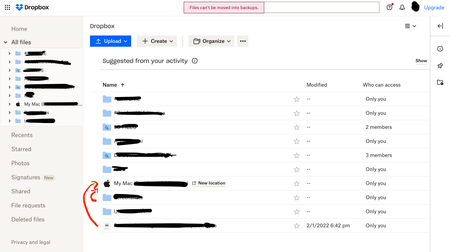
Hello, before I did it quietly, but since the transition to Dropbox Backup took place, through the web page it is no longer possible to transfer dropbox files and put them in the backup folders or vi...

Jay Dropbox Community Moderator
2 years agoDropbox Community ModeratorHi Mike1975, the Dropbox Backup feature and the normal syncing folder are considered to be separate sections.
This means that you can't move files to or from either location via the site.
If you want to move files from a Backup into the main Dropbox page, you'll need to find the actual files on your computer, and then move them manually. This will delete them from the Backup, and add it to the Home Movies folder.

Mike1975
2 years agoExplorer | Level 3
Thanks for responding.
That's the workaround I'm currently having to do. I think I'll need to move off the backup back too how it used to be, as this is something I do quite a bit, as I don't keep everything on my laptop.
Thanks again.
 Briskola2 years agoCollaborator | Level 8
What a shame! One of the most convenient features that existed has been removed without any logical connection. I never expected this from Dropbox, put it back since as you can see many users would like it!
About Delete, Edit, and Organize
Solve issues with deleting, editing, and organizing files and folders in your Dropbox account.
The Dropbox Community team is active from Monday to Friday. We try to respond to you as soon as we can, usually within 2 hours.
If you need more help you can view your support options (expected response time for an email or ticket is 24 hours), or contact us on X, Facebook or Instagram.
For more info on available support options for your Dropbox plan, see this article.
If you found the answer to your question in this Community thread, please 'like' the post to say thanks and to let us know it was useful!


