Your workflow is unique 👨💻 - tell us how you use Dropbox here.
Forum Discussion

AceConrad
3 months agoExplorer | Level 4
Can't delete backups that have filled up my Dropbox
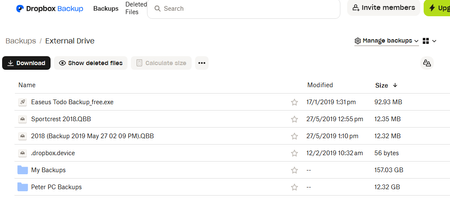
Dropbox account is over the limit because a few large files were backed up from an External Drive. Unfortunately the Computer that had the external drive attached died and is gone. The list of backu...
 3 months ago
AceConrad I can clarify what is happening with your external drive backup and what options you have now.
After completing a few checks of your account internally, deleting an unlinked device from your account likely won't help you delete the backup files.
External Drive Backups are read only. You cannot remove individual files or folders from them on the web or from another device. The only way to change what is included is from the original computer that created the backup by adjusting its Backup settings. Since you no longer have that machine, there is no way to trim or edit the backup.At this point you have two possible paths:
- Delete the entire external drive backup
This is the only supported way to free space if the original machine is gone.
You can do this on dropbox.com by going to Backups, selecting the external drive backup, and deleting it. This will immediately free the space. - If you want to keep the data
There is a feature called "Copy to computer" backup. It creates a normal folder copy that you can edit freely. It requires enough free quota to complete the copy. Since your account is already over quota, the copy will not finish unless you temporarily upgrade or clear space first. After the copy completes, you can delete the original backup.
Given your current situation, the only actionable path without upgrading is to delete the entire external drive backup.
If you want to keep the data, the only way is to raise your quota by upgrading to a paid plan, after we will opt you into "Copy to computer" feature, you will then copy your Backup content to Dropbox and after that you can delete the original backup.Let me know if you have questions and I can help walk you through the steps.
- Delete the entire external drive backup

Maynard
3 months agoNew member | Level 2
Having the same problem, I hate this! I am not paying for something I use every few months to share an video.
About Delete, Edit, and Organize
Solve issues with deleting, editing, and organizing files and folders in your Dropbox account.
The Dropbox Community team is active from Monday to Friday. We try to respond to you as soon as we can, usually within 2 hours.
If you need more help you can view your support options (expected response time for an email or ticket is 24 hours), or contact us on X, Facebook or Instagram.
For more info on available support options for your Dropbox plan, see this article.
If you found the answer to your question in this Community thread, please 'like' the post to say thanks and to let us know it was useful!


