We’re Still Here to Help (Even Over the Holidays!) - find out more here.
Forum Discussion

Hap H.
11 years agoNew member | Level 1
How can I remove duplicate photos from my Dropbox photos?
I somehow uploaded several hundred photos from my iphone to dropbox. Not sure how I did it, but now I see a lot of duplicate photos in dropbox (carousel).
54 Replies
 Titus C.10 years agoNew member | Level 1
Well I'm just p!ssed off with it. I'm on Android. Easy to run out of space. I don't need this. Uninstall is looking likely....
 Susanne A.10 years agoNew member | Level 1
I want to know when I do a system clean on my android including the large files will it delete the same files that are in my Dropbox
 Mike D.3010 years agoNew member | Level 1
I have the same issue with tons of duplicates getting created, and I'm 100% sure it started when I got rid of Carousel and upgraded to a version of the Dropbox app (on iPhone) that does the uploads. I did both of those things today and I went from no duplicates to hundreds of duplicates.
 Jane E.110 years agoNew member | Level 2
I'm sitting here watching notifications pop into my window showing dozens of duplicate photos being added. As several of you have recently said, the problem is not how to remove the duplicates but how to prevent them in the first place. I use an Android smartphone and a MacBook Pro and these duplicates have been showing up for over six months now. It is frustrating, a huge waste of storage space, and totally preventable. Has anyone else noticed that there are no official comments, replies or suggestions other than the ridiculous 8-step removal process?? Come on Dropbox, get your act together! You have a basically great product so please listen to your users and fix this problem!
 Meghan M.10 years agoHelpful | Level 5
Yes. It's exceptionally frustrating that there is no response. All well and good to say, "See ya, I'm dropping you Dropbox" but it is integrated and working perfectly with a bunch of other my other apps.
Make this work again! It used to work and I can't imagine it's an intractable problem. Dropbox please let us know you are working on this!
I've looked into Google Photos and it doesn't work the same way. I don't want 800 virtual low res copies spread around the cloud. I want one reliable full res copy of each of my phone pictures until I can't add the thing to Lightroom and my photo back-up scheme.
I just filled out this Dropbox Forum survey. Maybe if a bunch of us fill it out and complain about the lack of response someone might at least let us know if there is a fix in the works.
https://dropbox.az1.qualtrics.com/SE/?SID=SV_4HFdMjdHWsKtQ8Z
- Simon E.1110 years agoNew member | Level 1
I emailed with Dropbox support and this is the latest reply I've had:
If you are seeing (1) added to a file name, this means you added a file in a folder that already had the same type of file with the same file name. This usually happens with a copy.
If you see a file with -1 in the file name, this happens when a third party app changes your photo slightly. Dropbox sees this as a new photo and uploads it again. When it does, the file is renamed with a -1.jpg at the end. To stop this from happening, you will need to turn off camera uploads, uninstall any syncing or third party apps that could be editing your photos, and then turn camera uploads back on.
After this take a single photo. Is this photo duplicated? If not, you have uninstalled the application that is doing this.
I will try this later, but I don't think I have any other app syncing with Dropbox so I don't expect it to work.
- Simon E.1110 years agoNew member | Level 1
An update from Dropbox support - I got this mail this afternoon:
Thanks for reaching out about this! We apologize for the hassle and we appreciate your patience.
We're aware of this bug and working to fix it. When we have a fix in place, we'll release an update via the App Store, so make sure to stay up to date with the latest Dropbox releases.
Again, thanks for letting us know and thanks for using Dropbox!
 Karl H.410 years agoCollaborator | Level 8
It's early December 2016 and this is still happening. I took 5 videos on 12/1 and 12/2. On 12/4 at 5:36pm, something caused copies of these 5 videos to be uploaded to Dropbox in reverse order. That's 317mb of extra data.
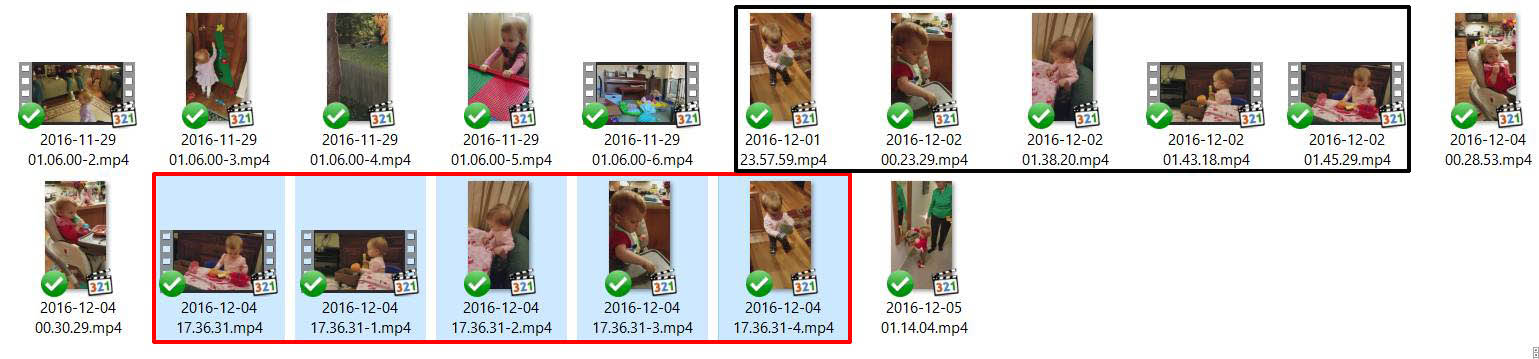
These are undetectable by duplicate file checking software, because they are changed in some small way -- the file size is slightly larger (by 76 bytes!):
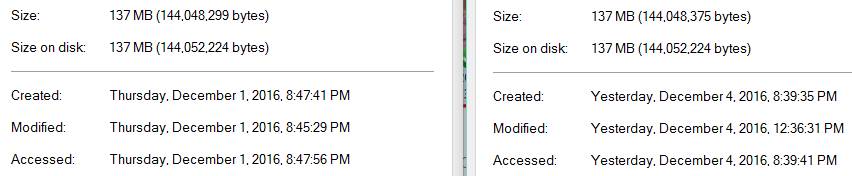
This started happening when I got a new Samsung S7 a few months ago. Something on the phone (that was not on my last phone) is changing these files, and finding what is doing it is the best way to fix this. I looked at my Google Photos and there is nothing there. I can't find any Samsung Cloud or Sync enabled on my phone. What other things might be responsible?
Dropbox is just doing what it's supposed to, so on one hand it's not to blame, but as long as it keeps happening they're going to have an increasing number of unhappy users, so it's in their interest to help find the culprit.
- Terry P.10 years agoCollaborator | Level 10
Simon E.11 sums up my own feelings too.
As a result of this serious upload issue, plus the announced discontinuation of the Public folder, and above all the apparent indifference of Dropbox Support to user complaints, I'm going to investigate Google Drive and iCloud and save myself £99 per year.
Terry, UK
- Karl H.49 years agoCollaborator | Level 8I think someone has found the responsible app. There is a Samsung "feature" that creates "events" out of your photos and possibly videos... Without being turned on and without informing you that it's doing this. (Maybe the next thing they can "give" us without asking is something to take all of our emails and texts and photos on a given day, and combine them into little stories! Wouldn't that be swell!) Anyway, go to Gallery and find Events (in a little pull-down menu), and turn off Auto-Create Events. Thanks to rin for finding this!
About Delete, edit, and organize
Solve issues with deleting, editing, and organizing files and folders in your Dropbox account with support from the Dropbox Community.
The Dropbox Community team is active from Monday to Friday. We try to respond to you as soon as we can, usually within 2 hours.
If you need more help you can view your support options (expected response time for an email or ticket is 24 hours), or contact us on X, Facebook or Instagram.
For more info on available support options for your Dropbox plan, see this article.
If you found the answer to your question in this Community thread, please 'like' the post to say thanks and to let us know it was useful!


