We’re Still Here to Help (Even Over the Holidays!) - find out more here.
Forum Discussion

klemensovo
12 months agoNew member | Level 1
How to Disable Deletion Warning for Online-Only Files
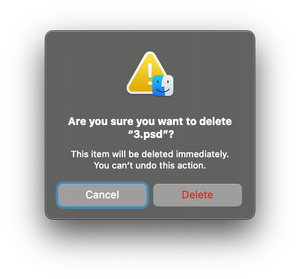
Whenever I try to delete an online-only file in my Dropbox folder on macOS, I get a confirmation popup saying the file will be deleted immediately and cannot be undone. While I understand the purpose...

klemensovo
12 months agoNew member | Level 1
Hi Jay,
I just quit Dropbox app entirely, and I was still receiving this message. I hope that helps you.

Jay Dropbox Community Moderator
12 months agoDropbox Community ModeratorThanks for the info. This means that this is a prompt generated by Finder, and not Dropbox, since it's still occurring when the app has been exited.
You may be able to find a setting within the Finder settings to disable this notification when deleting files.
About Delete, edit, and organize
Solve issues with deleting, editing, and organizing files and folders in your Dropbox account with support from the Dropbox Community.
The Dropbox Community team is active from Monday to Friday. We try to respond to you as soon as we can, usually within 2 hours.
If you need more help you can view your support options (expected response time for an email or ticket is 24 hours), or contact us on X, Facebook or Instagram.
For more info on available support options for your Dropbox plan, see this article.
If you found the answer to your question in this Community thread, please 'like' the post to say thanks and to let us know it was useful!


