Our Community is in read-only mode until April 8th, learn more here. You can still search existing threads or get help via Dropbox Support, the Dropbox Help Center, or Learn.
Forum Discussion

TroyK
5 months agoExplorer | Level 4
It should be possible to drill down to a folder before enabling restoring a deleted file.
in order to restore a deleted file, you first have to go to the main page and click 'deleted files' which then scans your master folder. This is not beneficial and it takes a long time. - It would be...

Megan Dropbox Community Moderator
5 months agoDropbox Community ModeratorHi TroyK, welcome to our Community!
If you access a folder of yours on our website, and then click the gear icon on the top right part, next to the folder's name you should be able to see the option "Folder settings".
Please try clicking there, and you should then have the "Show deleted files" option, which will show you the deleted items in this particular folder. That sounds very similar to what you already described. 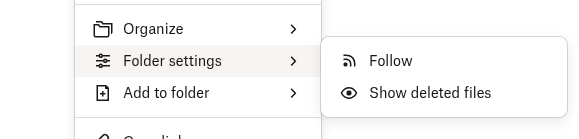
Can you give it a go, and let me know if this works as you intended it to?
Looking forward to your reply!

TroyK
5 months agoExplorer | Level 4
Good stuff, thank you for that.
How do I 'look' back further than 1 month? I can only see files back to 9/5, with today being 10/7 and I have files in there for years.
BTW I do have the 10 year recovery coverage.
Thank you for your time... appreciated.
About Delete, Edit, and Organize
Solve issues with deleting, editing, and organizing files and folders in your Dropbox account.
The Dropbox Community team is active from Monday to Friday. We try to respond to you as soon as we can, usually within 2 hours.
If you need more help you can view your support options (expected response time for an email or ticket is 24 hours), or contact us on X, Facebook or Instagram.
For more info on available support options for your Dropbox plan, see this article.
If you found the answer to your question in this Community thread, please 'like' the post to say thanks and to let us know it was useful!


