Our Community is in read-only mode until April 8th, learn more here. You can still search existing threads or get help via Dropbox Support, the Dropbox Help Center, or Learn.
Forum Discussion

hoangtm
2 years agoHelpful | Level 6
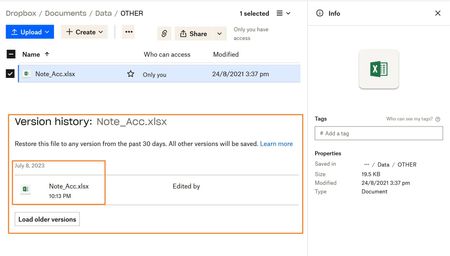
My Version history doesn't show any updates.
I have problem with my file and lost data
Exp : Note_acc.xlsx file , i'm sure edited 8 July, 2023 but when i open file but show data changed
I don't restore any version.
Modified : 24 Aug, 2021...
 2 years ago
Hi Megan
I used the desktop application to edit files, and I changed to another computer.
I'm thinking it has something to do with Windows Bitlocker, I use on OneDrive also have the same error.
Maybe this is a note for users to be more careful when using Bitlocker.
Currently, I cannot recover files and learn from experience when using data encryption.
Thank you for everyone's feedback
hoangtm
2 years agoHelpful | Level 6
I do not restore any versions Because I needed to check the file content
I realized the file was not archived, luckily I had a backup copy.

sarasvanberg
2 years agoExplorer | Level 4
I have lost weeks of work, it seams like dropbox is not syncing due to space limitations but I havent been notified and when saving nothing looks strange. In this perticular case I have a huge document that I have been working on for weeks. But looking at the history it seams like it hasnt been updated since oktober the 3, which is totaly wrong. Is there anyway to fix this?? I am totally devastated as this is for a school work.
- Mark2 years ago
Super User II
Hi sarasvanberg
Dropbox will stop syncing when you are over space and will show an error on the software on your machine and also email you (if you have it set up).
The good thing is if you bring the account under quota the files SHOULD reupload to Dropbox that have been missed as long as they are in your Dropbox folder still. If they are not then no, Dropbox cannot recover I'm afraid as they've never had a copy of your file - it doesn't even know it exists.

About Delete, Edit, and Organize
Solve issues with deleting, editing, and organizing files and folders in your Dropbox account.
The Dropbox Community team is active from Monday to Friday. We try to respond to you as soon as we can, usually within 2 hours.
If you need more help you can view your support options (expected response time for an email or ticket is 24 hours), or contact us on X, Facebook or Instagram.
For more info on available support options for your Dropbox plan, see this article.
If you found the answer to your question in this Community thread, please 'like' the post to say thanks and to let us know it was useful!


