Our Community is in read-only mode until April 8th, learn more here. You can still search existing threads or get help via Dropbox Support, the Dropbox Help Center, or Learn.
Forum Discussion

hoangtm
2 years agoHelpful | Level 6
My Version history doesn't show any updates.
I have problem with my file and lost data
Exp : Note_acc.xlsx file , i'm sure edited 8 July, 2023 but when i open file but show data changed
I don't restore any version.
Modified : 24 Aug, 2021...
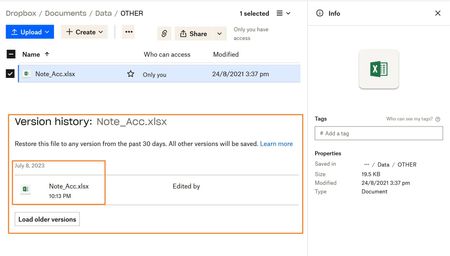
 2 years ago
Hi Megan
I used the desktop application to edit files, and I changed to another computer.
I'm thinking it has something to do with Windows Bitlocker, I use on OneDrive also have the same error.
Maybe this is a note for users to be more careful when using Bitlocker.
Currently, I cannot recover files and learn from experience when using data encryption.
Thank you for everyone's feedback
hoangtm
2 years agoHelpful | Level 6
I do not restore any versions Because I needed to check the file content
I realized the file was not archived, luckily I had a backup copy.

Megan Dropbox Community Moderator
2 years agoDropbox Community ModeratorHi hoangtm, sorry to hear about that!
Did you use the desktop app, in order to change and edit the file? When was the last time you checked online for the file updates?
Had that been the case, and if you were using the app, are you positive that it was syncing the changes online and that the app wasn't closed, or not syncing for some reason?
Let me know more!
- hoangtm2 years agoHelpful | Level 6
Hi Megan
I used the desktop application to edit files, and I changed to another computer.
I'm thinking it has something to do with Windows Bitlocker, I use on OneDrive also have the same error.
Maybe this is a note for users to be more careful when using Bitlocker.
Currently, I cannot recover files and learn from experience when using data encryption.
Thank you for everyone's feedback
About Delete, Edit, and Organize
Solve issues with deleting, editing, and organizing files and folders in your Dropbox account.
The Dropbox Community team is active from Monday to Friday. We try to respond to you as soon as we can, usually within 2 hours.
If you need more help you can view your support options (expected response time for an email or ticket is 24 hours), or contact us on X, Facebook or Instagram.
For more info on available support options for your Dropbox plan, see this article.
If you found the answer to your question in this Community thread, please 'like' the post to say thanks and to let us know it was useful!


