Your workflow is unique 👨💻 - tell us how you use Dropbox here.
Forum Discussion

KEAlt
10 months agoNew member | Level 1
Naming conventions are sometimes buggy in subfolders.
I have a parent folder with an automation that's supposed to rename every file in its subfolders to a certain format, but it's been very buggy on if it actually works or not... I don't know if it's ...

Megan Dropbox Community Moderator
10 months agoDropbox Community ModeratorHi there, KEAlt let's jump right into this!
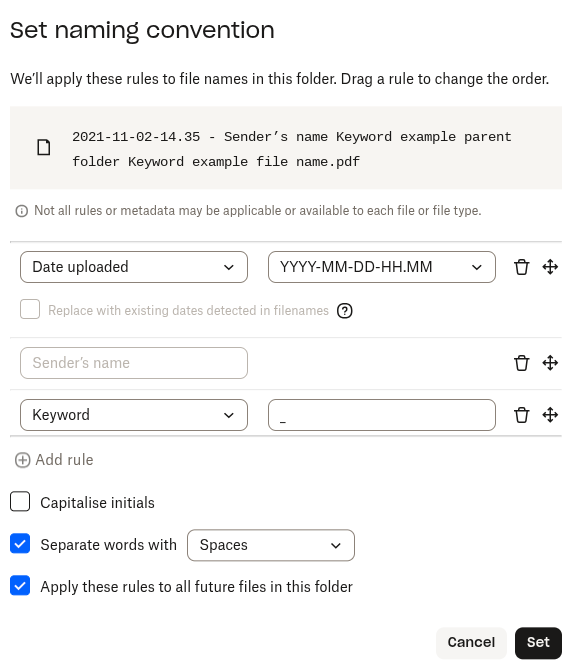
What options are you choosing for the naming convention settings?
Do you notice a specific pattern, or sometimes files get renamed while other times they don't?
Does this happen with some of the nested folders or all of them?
Feel free to attach any screenshots if you wish, in order for us to have a visual.
Keep me posted!
 KEAlt10 months agoNew member | Level 1
I have the convention in my parent folder as
Date (DD-MM-YYYY-HH.MM)
Sender
Keyword '_'
Parent folder name
Keyword '_'
FilenameThe problem that got my attention was one child folder had files being renamed as
"date - (blank, sender was supposed to be here) _ parentFolderName _ sender - filename"
I had a different child folder that used the correct convention.I did notice that the file requests themselves have naming conventions... I set all my file requests to have the naming convention I want, and that works... but I'm going to be making a lot of file requests, and having to set the naming convention every time is going to be a chore. It should just use the parent folder's convention.
Also, I'm not really sure what the difference is between a naming convention and an automation? My parent folder only has the option for an automation that renames everything. It seems to do pretty much the same thing?
Also also, I don't know why but this site keeps deleting my posts as I'm almost done typing them out and I have to start over... It's happened like 4 times now. It's driving me crazy!! I have to start typing everything in notepad and pasting it in!- Jay10 months ago
Hi KEAlt, could you provide a more precise example of what the resulting file name was, since it's a little confusing without information. You can change the names of the actual sender, and the name in the filename, to a generic name to make it free of privacy concerns.
Regarding the difference between automations and naming conventions, you can have the latter on its own without needing to create an automation. On the other hand, automations can include multiple steps, such as converting files, as well as naming conventions.
- KEAlt10 months agoNew member | Level 1
Ok, an example is
"01-01-1970-12.34 - _ MasterFolder _ Testman - 1234.pdf"
when it's supposed to be
"01-01-1970-12.34 - Testman _ MasterFolder _ 1234.pdf"
The parent folder doesn't have the option to make a naming convention anymore, only an automation.
I thought I put a convention on the parent folder before, but it's been a confusing process...
- Jay10 months ago
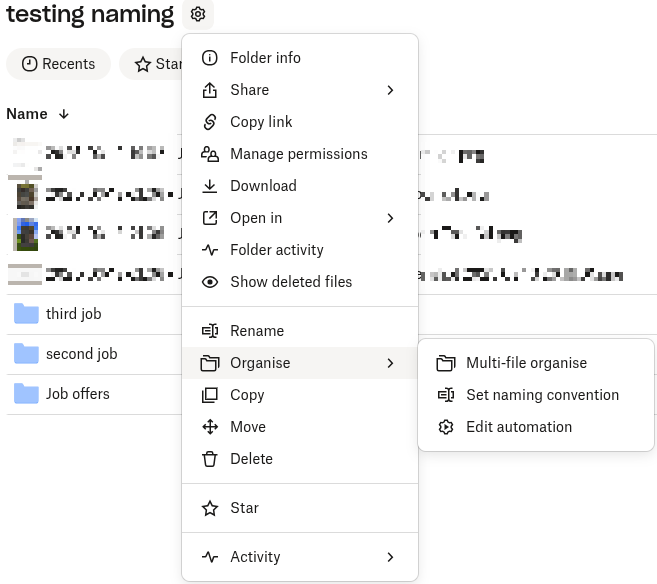
After testing this some more, when you apply a naming convention, it becomes an automation immediately for that folder, and subfolders if you've enabled that feature.
Could you attach a screenshot showing the options you get on the parent folder?
 TKEotK10 months agoExplorer | Level 4
It only has the automation option, not the other 2...

About Delete, Edit, and Organize
Solve issues with deleting, editing, and organizing files and folders in your Dropbox account.
The Dropbox Community team is active from Monday to Friday. We try to respond to you as soon as we can, usually within 2 hours.
If you need more help you can view your support options (expected response time for an email or ticket is 24 hours), or contact us on X, Facebook or Instagram.
For more info on available support options for your Dropbox plan, see this article.
If you found the answer to your question in this Community thread, please 'like' the post to say thanks and to let us know it was useful!


