Your workflow is unique 👨💻 - tell us how you use Dropbox here.
Forum Discussion

KEAlt
10 months agoNew member | Level 1
Naming conventions are sometimes buggy in subfolders.
I have a parent folder with an automation that's supposed to rename every file in its subfolders to a certain format, but it's been very buggy on if it actually works or not... I don't know if it's ...

KEAlt
10 months agoNew member | Level 1
I have the convention in my parent folder as
Date (DD-MM-YYYY-HH.MM)
Sender
Keyword '_'
Parent folder name
Keyword '_'
Filename
The problem that got my attention was one child folder had files being renamed as
"date - (blank, sender was supposed to be here) _ parentFolderName _ sender - filename"
I had a different child folder that used the correct convention.
I did notice that the file requests themselves have naming conventions... I set all my file requests to have the naming convention I want, and that works... but I'm going to be making a lot of file requests, and having to set the naming convention every time is going to be a chore. It should just use the parent folder's convention.
Also, I'm not really sure what the difference is between a naming convention and an automation? My parent folder only has the option for an automation that renames everything. It seems to do pretty much the same thing?
Also also, I don't know why but this site keeps deleting my posts as I'm almost done typing them out and I have to start over... It's happened like 4 times now. It's driving me crazy!! I have to start typing everything in notepad and pasting it in!

Jay Dropbox Community Moderator
10 months agoDropbox Community ModeratorHi KEAlt, could you provide a more precise example of what the resulting file name was, since it's a little confusing without information. You can change the names of the actual sender, and the name in the filename, to a generic name to make it free of privacy concerns.
Regarding the difference between automations and naming conventions, you can have the latter on its own without needing to create an automation. On the other hand, automations can include multiple steps, such as converting files, as well as naming conventions.
- KEAlt10 months agoNew member | Level 1
Ok, an example is
"01-01-1970-12.34 - _ MasterFolder _ Testman - 1234.pdf"
when it's supposed to be
"01-01-1970-12.34 - Testman _ MasterFolder _ 1234.pdf"
The parent folder doesn't have the option to make a naming convention anymore, only an automation.
I thought I put a convention on the parent folder before, but it's been a confusing process...- Jay10 months ago
Please could you attach a screenshot showing the exact settings you have for the naming convention, or automation, for the parent folder?
It shouldn't be possible to add the sender from the normal naming conventions page or automation settings. It should only be visible from the file requests page, or an already existing naming convention if it was previously applied.
Also, the date format you've mentioned doesn't seem to be an option on the site.
- KEAlt10 months agoNew member | Level 1This is the parent folder
Sorry, I said the date format backwards- Jay10 months ago
Thanks for the images. I've managed to replicate the same behavior you mentioned, and after a lot of testing, I was able to figure out how to avoid this, and more importantly, why this is happening.
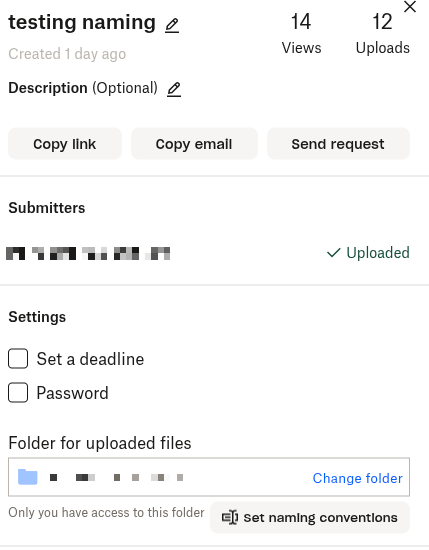
Long story short, to prevent this from occurring in subfolders, on the File request page, click the 'Set naming conventions button' there:
Then, for the next window, remove the Sender's name option entirely so it looks like this.
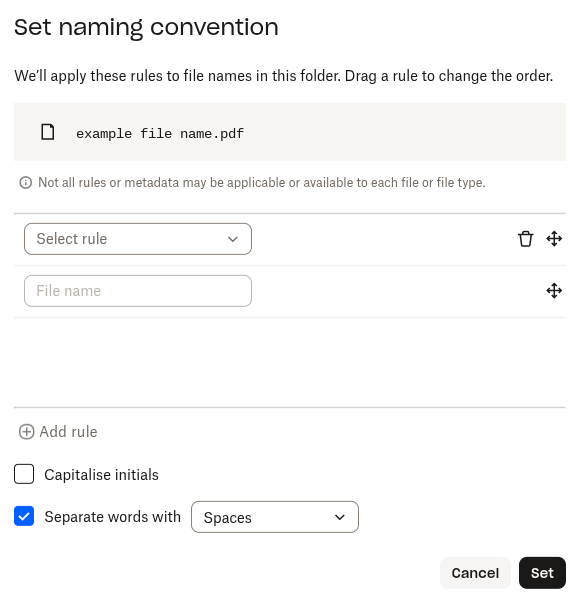
The folder I chose is a subfolder of a page with the exact automation you created, and all files came out with the correct name.
Now, if you want to know why this was occurring, because file requests automatically add the sender's name in the default naming convention after the filename, this means that files would look like 'test1 Jay.png'.
After doing the tests, my belief is that Dropbox can only access the 'sender's name' once in total. So, when the automation tried to add a sender name, it couldn't access it, and left it blank.
The filename itself, which is then added by the automation 'correctly' would be the test1 Jay.png, which was generated by the original naming convention in the file request, hence the wrong order you were seeing (with sender name and filename in a different order on your end).
When you remove the sender's name from the original file request, the parent folder automation would be able to grab that variable, and then put it in the correct order.
Could you test this out and let me know if this helps?
- KEAlt10 months agoNew member | Level 1
I think that worked, but all my previous files are not affected, where if I put the convention in the file request, it fixes all the names.
I'm confused why my parent folder doesn't have a naming convention option anymore, only an automation option that only seems to apply when new files are uploaded, so the old ones aren't renamed
About Delete, Edit, and Organize
Solve issues with deleting, editing, and organizing files and folders in your Dropbox account.
The Dropbox Community team is active from Monday to Friday. We try to respond to you as soon as we can, usually within 2 hours.
If you need more help you can view your support options (expected response time for an email or ticket is 24 hours), or contact us on X, Facebook or Instagram.
For more info on available support options for your Dropbox plan, see this article.
If you found the answer to your question in this Community thread, please 'like' the post to say thanks and to let us know it was useful!


