Our Community is in read-only mode until April 8th, learn more here. You can still search existing threads or get help via Dropbox Support, the Dropbox Help Center, or Learn.
Forum Discussion

gabby1
7 years agoExplorer | Level 4
"tmp.drivedownload" Error - unable to resolve with tech support escalation
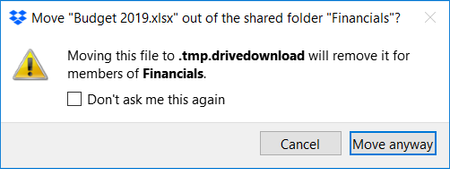
This error has been happening for weeks, and tech support has unfortunately been totally unable to help me. Thought I'd pitch this here. I am on several shared folders with other groups. Whenever...
 7 years ago
Thanks, Jay, I did manage to delete it however it was not Dropbox that was stopping the process, it was Google Drive that was making it impossible have no idea why! I cannot understand how Google Drive put the folder in there in the first place then took control of it. I was thinking like yourself if Dropbox is finished syncing I should be able to delete it, however, I had to stop Google Drive to delete it. All worked in the end! All those pop-up messages also turned out to be saving files in that folder too which is why the folder was getting bigger and bigger and nothing got accidentally deleted. :)

gabby1
7 years agoExplorer | Level 4
Thanks Jay - yes, what you describe is what should be happening, but this problem with the popup message and files self-deleting is happening outside the normal processes.
gabby1
7 years agoExplorer | Level 4
I should restate for clarity, *nobody is trying to delete any files*, it's happening on its' own. This popup and the possible deletion occurs when (for example) another person (not me) opens the file, makes a change, and then simply tries to save it back where it came from.
This is the dangerous part that I couldn't get tech support to understand. If I were to click "move anyway" on the original popup box, I have no idea what would happen. I always clicked "cancel" and "don't show this message again", which I *hope* stopped the deletion of the file... again, no way to test this without seriously making a mess.
- lalala19977 years agoNew member | Level 2
I am also having this issue! I to have had those messages and had to click on cancel. I can see the tmp.drivedownload folder in my Dropbox folder and it should not be there, for some reason it is, it is also in the Google Drive folder, however, there are no files in it. What I was attempting to do was move some files onto Google Drive and keep only some on Dropbox. However, my Dropbox folder has decided that will not be the case because I cannot delete the tmp.drivedownload folder that seems to be getting bigger and bigger. Therefore I think after all my files from Dropbox are uploaded to Google Drive I will have to uninstall dropbox as it is basically useless to me due to this undeletable tmp.drivedownload folder.
- gabby17 years agoExplorer | Level 4
Well, that frustrates me even more, because Dropbox claimed they had never seen this before. I had to assume that at least one other person had the same issue.
Did you reach out to tech support? What was their response?
- Jay7 years ago
Dropbox Community Moderator
Hi lalala1997, if that folder is in your Dropbox account and is taking up space, you can try deleting the folder when the Dropbox desktop application is paused, or closed completely.
The next time it syncs, it’ll detect that the folder is missing and then remove it from your machine and the site.

About Delete, Edit, and Organize
Solve issues with deleting, editing, and organizing files and folders in your Dropbox account.
The Dropbox Community team is active from Monday to Friday. We try to respond to you as soon as we can, usually within 2 hours.
If you need more help you can view your support options (expected response time for an email or ticket is 24 hours), or contact us on X, Facebook or Instagram.
For more info on available support options for your Dropbox plan, see this article.
If you found the answer to your question in this Community thread, please 'like' the post to say thanks and to let us know it was useful!


