Our Community is in read-only mode until April 8th, learn more here. You can still search existing threads or get help via Dropbox Support, the Dropbox Help Center, or Learn.
Forum Discussion

gabby1
7 years agoExplorer | Level 4
"tmp.drivedownload" Error - unable to resolve with tech support escalation
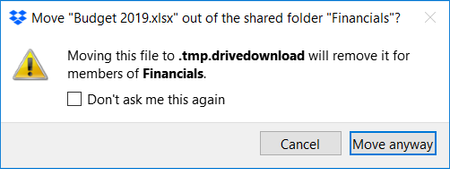
This error has been happening for weeks, and tech support has unfortunately been totally unable to help me. Thought I'd pitch this here. I am on several shared folders with other groups. Whenever...
 7 years ago
Thanks, Jay, I did manage to delete it however it was not Dropbox that was stopping the process, it was Google Drive that was making it impossible have no idea why! I cannot understand how Google Drive put the folder in there in the first place then took control of it. I was thinking like yourself if Dropbox is finished syncing I should be able to delete it, however, I had to stop Google Drive to delete it. All worked in the end! All those pop-up messages also turned out to be saving files in that folder too which is why the folder was getting bigger and bigger and nothing got accidentally deleted. :)
lalala1997
7 years agoNew member | Level 2
Thanks, Jay, I did manage to delete it however it was not Dropbox that was stopping the process, it was Google Drive that was making it impossible have no idea why! I cannot understand how Google Drive put the folder in there in the first place then took control of it. I was thinking like yourself if Dropbox is finished syncing I should be able to delete it, however, I had to stop Google Drive to delete it. All worked in the end! All those pop-up messages also turned out to be saving files in that folder too which is why the folder was getting bigger and bigger and nothing got accidentally deleted. :)

Doppler44
4 years agoExplorer | Level 4
I could not sync over 30,000 files for days. I did the following three things and Dropbox synced within 10 minutes: 1) As I have the google drive app on my computer (part of my workplace) I paused syncing (using the Google drive taskbar icon). Google drive was trying to sync >60,000 files for some reason. 2) I found a "tmp.driveupload" folder in my Dropbox that also seems to be a Google drive folder - similar to threads that discuss a "tmp.drivedownload" folder...I deleted it; 3) I had a "pictures" folder in my Dropbox as a backup of folders and also one in my C\users\"username"\documents\ folder. I renamed that folder in Dropbox to "Pictures_Dropbox".
I had previously tried updating Dropbox (it did so successfully); rebooting my desktop (including shutting it down & restarting the Windows 10 64 bit computer), and pausing and restarting Dropbox Sync from the taskbar icon - all done numerous time to no benefit.
I think from this experience and what I've read in other threads that Google drive or syncing or ? pictures can prevent Dropbox from syncing. I'd note that Dropbox syncs fine on my laptop that does not run Google drive in the background. Hope this helps someone.
About Delete, Edit, and Organize
Solve issues with deleting, editing, and organizing files and folders in your Dropbox account.
The Dropbox Community team is active from Monday to Friday. We try to respond to you as soon as we can, usually within 2 hours.
If you need more help you can view your support options (expected response time for an email or ticket is 24 hours), or contact us on X, Facebook or Instagram.
For more info on available support options for your Dropbox plan, see this article.
If you found the answer to your question in this Community thread, please 'like' the post to say thanks and to let us know it was useful!


