Our Community is in read-only mode until April 8th, learn more here. You can still search existing threads or get help via Dropbox Support, the Dropbox Help Center, or Learn.
Forum Discussion

gabby1
7 years agoExplorer | Level 4
"tmp.drivedownload" Error - unable to resolve with tech support escalation
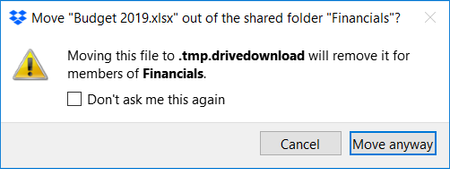
This error has been happening for weeks, and tech support has unfortunately been totally unable to help me. Thought I'd pitch this here. I am on several shared folders with other groups. Whenever...
 7 years ago
Thanks, Jay, I did manage to delete it however it was not Dropbox that was stopping the process, it was Google Drive that was making it impossible have no idea why! I cannot understand how Google Drive put the folder in there in the first place then took control of it. I was thinking like yourself if Dropbox is finished syncing I should be able to delete it, however, I had to stop Google Drive to delete it. All worked in the end! All those pop-up messages also turned out to be saving files in that folder too which is why the folder was getting bigger and bigger and nothing got accidentally deleted. :)

Djbirnbaum1
2 years agoExplorer | Level 4
I have a similar issue. I'm a single solo DB user. I have selective sync set to online-only. Within my cloud DB I have 999 conflict folders named:
"tmp.driveupload
(selective sync conflict #". Where # is a number from 1 to 999. If I click on one of those folder I get about 75 files named with random 6 digits.
I also use Google Drive on some of my DB files.
How do I eliminate the 999 folders? Any help is much appreciated.
"tmp.driveupload
(selective sync conflict #". Where # is a number from 1 to 999. If I click on one of those folder I get about 75 files named with random 6 digits.
I also use Google Drive on some of my DB files.
How do I eliminate the 999 folders? Any help is much appreciated.

Megan Dropbox Community Moderator
2 years agoDropbox Community ModeratorHey Djbirnbaum1 , welcome to our Community!
You can see more about selective sync conflicts, how to prevent them from happening and what you can do about them at this Help Center article.
Are the conflicts duplicated content? Have you tried manually removing them?
Let me know more!
About Delete, Edit, and Organize
Solve issues with deleting, editing, and organizing files and folders in your Dropbox account.
The Dropbox Community team is active from Monday to Friday. We try to respond to you as soon as we can, usually within 2 hours.
If you need more help you can view your support options (expected response time for an email or ticket is 24 hours), or contact us on X, Facebook or Instagram.
For more info on available support options for your Dropbox plan, see this article.
If you found the answer to your question in this Community thread, please 'like' the post to say thanks and to let us know it was useful!


