Your workflow is unique 👨💻 - tell us how you use Dropbox here.
Forum Discussion

Noah125
5 years agoHelpful | Level 5
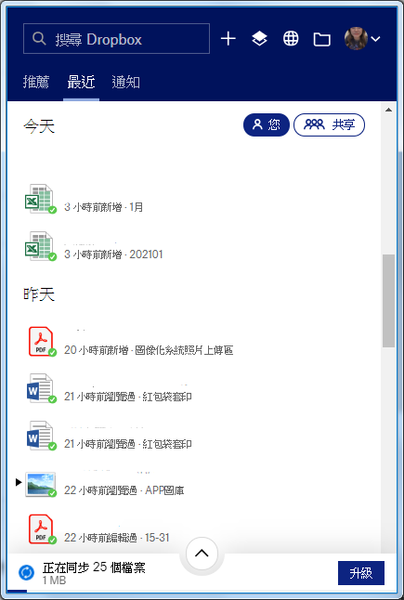
顯示同步中 但無法完成同步
容量還沒滿 但是一直在同步中 有共同資料夾的 只有兩位有呈現 資料在同步中 其他成員沒有顯示資料也沒有出現正在同步中

lejtw
5 years agoHelpful | Level 6
Hi Walter,
NO. I am a heavy computer user. No firewall, No antivirus, No proxy etc. This happened suddenly today!
lejtw
5 years agoHelpful | Level 6
Hi Walter,
This happened on my Macbook Air(MacOS Catalina) too! No only on Windows 10.
A 4MB file uploding/syncing...stuck like hell!
BTW, I have 100m/40m Internet connection. So this is very unusual.
I can still upload and download file as fast as normal via Dropbox WEB interface.
This syncing stuck situation is only happened in the desktop APP.
 btway5 years agoExplorer | Level 3
看到多年前有篇mobile 01貼文,將Chrome的cookies清除再重開,就OK了,大家可以試試看。
- C. Wei-Bin4 years agoExplorer | Level 3
I tried all the steps you suggested above, but none of them fixed this issue. It is bothering me for years. I use Macbook Pro with MacOS 12.2. The dropbox is v140.4.195.
- Megan4 years ago
Dropbox Community Moderator
Hi C. Wei-Bin, let's see what we can do about it.
Is the app stuck on a specific file name?
Does it show you a specific number there, or just say "Syncing..."?
Let me know!


About Create, Upload, and Share
Find help to solve issues with creating, uploading, and sharing files and folders with Dropbox.
The Dropbox Community team is active from Monday to Friday. We try to respond to you as soon as we can, usually within 2 hours.
If you need more help you can view your support options (expected response time for an email or ticket is 24 hours), or contact us on X, Facebook or Instagram.
For more info on available support options for your Dropbox plan, see this article.
If you found the answer to your question in this Community thread, please 'like' the post to say thanks and to let us know it was useful!


