2025 sparked some incredible conversations across our community 👩💻. Discover the highlights and see what’s ahead in 2026.
Forum Discussion

timmyg62
3 days agoNew member | Level 2
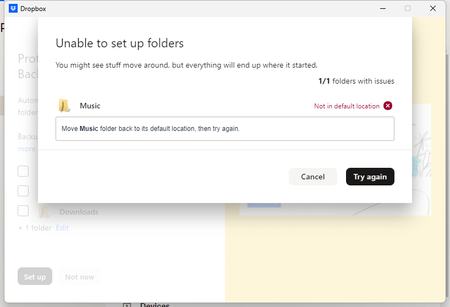
Backup unable to enable: Backup "Not in default location"
Device OMEN by HP 45L Gaming Desktop GT22 Operating System/Browser (if using the web) Windows 11 Home Version 23H2 Dropbox App Version (if using the app) v238.4.6305 Syncing Status Syncing
...

Megan Dropbox Community Moderator
2 days agoDropbox Community ModeratorHey timmyg62, let's jump right into this!
As a first step, I suggest that you also take a look at this Help Center article. Usually the backup should target the system folders. Is the Music drive you see on the device also backed up in another service maybe?
Keep in mind that in order for folders to be able to backed up with Dropbox Backup, they need to be in their original location, which would be your user's profile’s home folder since this is the default location where the folder is being created when you first install the application.
If you try to enable any other directories under your D: drive, do you get the same error?
Let me know more, and we'll take it from there!
About Create, upload, and share
Find help to solve issues with creating, uploading, and sharing files and folders in Dropbox. Get support and advice from the Dropbox Community.
The Dropbox Community team is active from Monday to Friday. We try to respond to you as soon as we can, usually within 2 hours.
If you need more help you can view your support options (expected response time for an email or ticket is 24 hours), or contact us on X, Facebook or Instagram.
For more info on available support options for your Dropbox plan, see this article.
If you found the answer to your question in this Community thread, please 'like' the post to say thanks and to let us know it was useful!


