We’re Still Here to Help (Even Over the Holidays!) - find out more here.
Forum Discussion

Ech0M4n
3 years agoExplorer | Level 3
Camera upload failing
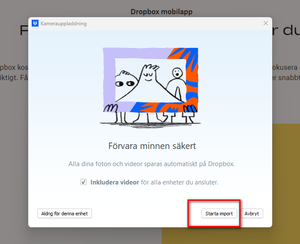
New PC, Windows with Swedish language (my old PC had English OS). Cable-connecting my Anroid/Samsung Galaxy S9 to the PC. I get the Dropbox "splash screen" and choose to Start Import. Then I get an ...

Ech0M4n
3 years agoExplorer | Level 3
Hi!
I stopped limiting battery usage in the Dropbox app on my phone (as per the linked helöp centre article).
For the second setting, I could not find the Dropbox app in the list of apps to never sleep.
Still getting the same error message as before unfortunately. BUT uploading new photos to my PC anyway (after the error message) with some delay. So something good has happened. 🙂
Ech0M4n
3 years agoExplorer | Level 3
Well, it seems to happen cable-attached or not, so I guess my phone does add the images to the Dropbox app, and after some time it is synced with my desktop. I guess I can live with this, just have to try to change my behaviour since a decade or so. 🙂
- Megan3 years ago
Dropbox Community Moderator
Hi Ech0M4n,thanks for the info!
it seems you're using a Beta version (171.3.6157) of our desktop app, which could be the culprit there.
Can you make sure that Early releases are set to off, in your account settings, and then try re-installing our latest stable?
- Ech0M4n3 years agoExplorer | Level 3
Having the same error mesasage after re-installing and rebooting. 😞

About Create, upload, and share
Find help to solve issues with creating, uploading, and sharing files and folders in Dropbox. Get support and advice from the Dropbox Community.
The Dropbox Community team is active from Monday to Friday. We try to respond to you as soon as we can, usually within 2 hours.
If you need more help you can view your support options (expected response time for an email or ticket is 24 hours), or contact us on X, Facebook or Instagram.
For more info on available support options for your Dropbox plan, see this article.
If you found the answer to your question in this Community thread, please 'like' the post to say thanks and to let us know it was useful!


