Need to see if your shared folder is taking up space on your dropbox 👨💻? Find out how to check here.
Forum Discussion

rroscoe
6 years agoNew member | Level 2
Camera uploads - duplicates
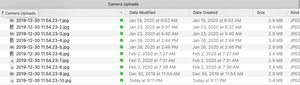
I recently had some assistance from the Dropbox team (thank you!) to get photos from my iPhone 8 to upload when my phone is connected to my computer. That is working now - too well, it seems. It uplo...

Daphne Dropbox Community Moderator
6 years agoDropbox Community ModeratorHey rroscoe, I hope you're having a good day so far!
Could you just try toggling off and then on again the option for camera uploads within the desktop app to see if that does the trick?
When using camera uploads, it shouldn't upload files that have been upload before and it should also retain the date created too.
If you have edited versions of photos though, both the original and edited version is expected to upload with the automatic camera uploads feature. You can check out a bit more info about this here.
Let me know if this helps!
 idfcjustheretocomplain3 years agoNew member | Level 2
having that as the default option is really **bleep**ing stupid
About Create, upload, and share
Find help to solve issues with creating, uploading, and sharing files and folders in Dropbox. Get support and advice from the Dropbox Community.
The Dropbox Community team is active from Monday to Friday. We try to respond to you as soon as we can, usually within 2 hours.
If you need more help you can view your support options (expected response time for an email or ticket is 24 hours), or contact us on X, Facebook or Instagram.
For more info on available support options for your Dropbox plan, see this article.
If you found the answer to your question in this Community thread, please 'like' the post to say thanks and to let us know it was useful!


