Your workflow is unique 👨💻 - tell us how you use Dropbox here.
Forum Discussion

markscranton
5 months agoNew member | Level 2
Cannot sync due to permissions on macOS Tahoe
Device Macbook Pro
Operating System/Browser (if using the web) Mac OS 26 Tahoe (same behavior on previous Mac OS)
Dropbox App Version (if using the app)
232.4.5988
Syncing Status Cann...
 5 months ago
That seems to have worked for now. Thanks. Will come back if it happens again.

Walter Dropbox Community Moderator
5 months agoDropbox Community ModeratorHey mrrichardlewis - did you get the chance to try my previous suggestion?
mrrichardlewis
5 months agoHelpful | Level 5
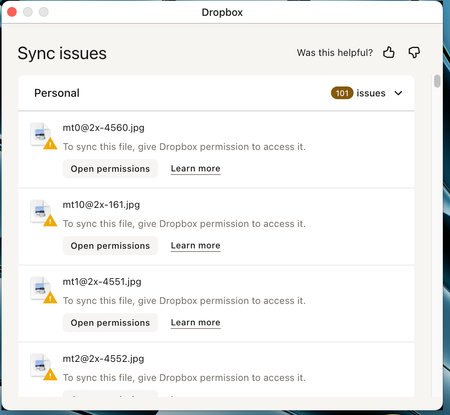
If I click open permissions - an OS dialog opens and asks for my password. But I have to do this for each folder. I have more than 50 in the list.
This message shows in window, but It doesn't seem to reduce the number of "issues" even when left for a long time.
- Walter5 months ago
I see, thanks for the additional information and the screenshot too mrrichardlewis - much appreciated.
Since you've ensured that Dropbox has full disk access, can you check if copying and/or moving those folders out and back in your Dropbox folder makes any difference? You can try it with a folder as a test at first.
Let us know of any updates.
About Create, Upload, and Share
Find help to solve issues with creating, uploading, and sharing files and folders with Dropbox.
The Dropbox Community team is active from Monday to Friday. We try to respond to you as soon as we can, usually within 2 hours.
If you need more help you can view your support options (expected response time for an email or ticket is 24 hours), or contact us on X, Facebook or Instagram.
For more info on available support options for your Dropbox plan, see this article.
If you found the answer to your question in this Community thread, please 'like' the post to say thanks and to let us know it was useful!


