Your workflow is unique 👨💻 - tell us how you use Dropbox here.
Forum Discussion

Georgesmiley
4 years agoNew member | Level 2
Can't clear sync queue which is blocking all other syncs
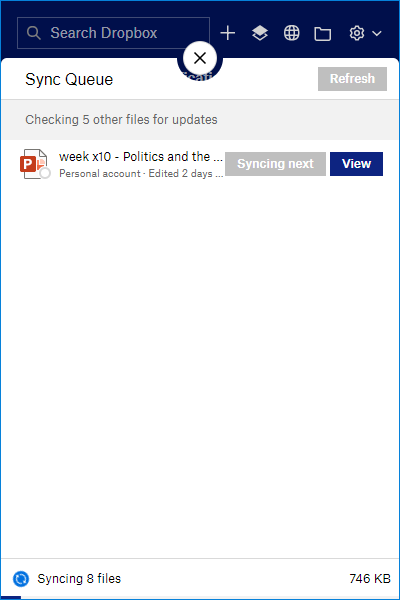
My Dropbox account on my work Windows 10 laptop has stopped working.
this seems to be because it's stuck trying to sync a file that no longer exists:
It's been doing this for days....

phoebelynphotography
2 years agoNew member | Level 2
Hi Walter, thanks for your help!
My desktop is a 2020 iMac with macOS Ventura 13.5.2. and my Dropbox app is v185.4.6054. I tried a few things, and afterwards, the ~8GB folder I've been to trying to upload for over a week successfully uploaded!
However, before this occurred, when I moved files that are being uploaded out of my Dropbox folder and dragged them back in, they wouldn't show up in the Dropbox upload monitoring tab on my menu bar. I knew there should've been more files set to upload, but Dropbox was only showing 16 or so items uploading at a time. It was super laggy, showing about 16 items trying to upload at once. Then I started typing this response, and when I looked back at Dropbox everything had uploaded! Weird. But I'm so glad it finally synced.
Thanks again for your help.

Walter Dropbox Community Moderator
2 years agoDropbox Community ModeratorNo worries phoebelynphotography - I'm glad to hear it's sorted now and thanks for keeping us in the loop too.
See you around the Community and take care!
About Create, Upload, and Share
Find help to solve issues with creating, uploading, and sharing files and folders with Dropbox.
The Dropbox Community team is active from Monday to Friday. We try to respond to you as soon as we can, usually within 2 hours.
If you need more help you can view your support options (expected response time for an email or ticket is 24 hours), or contact us on X, Facebook or Instagram.
For more info on available support options for your Dropbox plan, see this article.
If you found the answer to your question in this Community thread, please 'like' the post to say thanks and to let us know it was useful!


